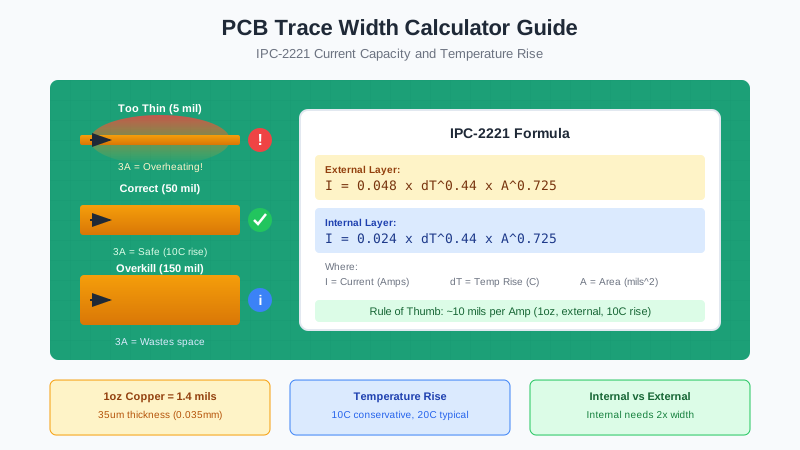
Choosing the correct trace width is one of the most critical decisions in PCB design. Too narrow, and your trace overheats, melts, or becomes a fuse. Too wide, and you waste board space that could be used for routing or components. This guide covers everything you need to know about PCB trace width calculations.
1. Why Trace Width Matters
Every PCB trace has electrical resistance, and when current flows through that resistance, it generates heat (P = I²R). The trace must be wide enough to:
- Carry the required current without excessive heating
- Stay below a safe temperature rise (typically 10-20°C above ambient)
- Meet impedance requirements for high-speed signals
- Survive manufacturing without defects or breaks
- Handle transient currents (startup, motor stall, short circuit)
Critical Warning
An undersized trace can act as a fuse, melting during overcurrent conditions and causing board failure or fire. Always add safety margin to your calculations.
2. IPC Standards Explained (IPC-2221 vs IPC-2152)
Two main IPC standards govern trace width calculations. Understanding when to use each is essential for professional designs.
IPC-2221: The Classic Standard
IPC-2221 (Generic Standard on Printed Board Design) has been the industry standard since 1998. Its trace width charts are derived from military specifications (MIL-STD-275) dating back to the 1950s-60s.
IPC-2221 Formula (External Layers):
I = 0.048 × ΔT^0.44 × A^0.725
IPC-2221 Formula (Internal Layers):
I = 0.024 × ΔT^0.44 × A^0.725
Where:
- I = Current in Amps
- ΔT = Temperature rise above ambient in °C
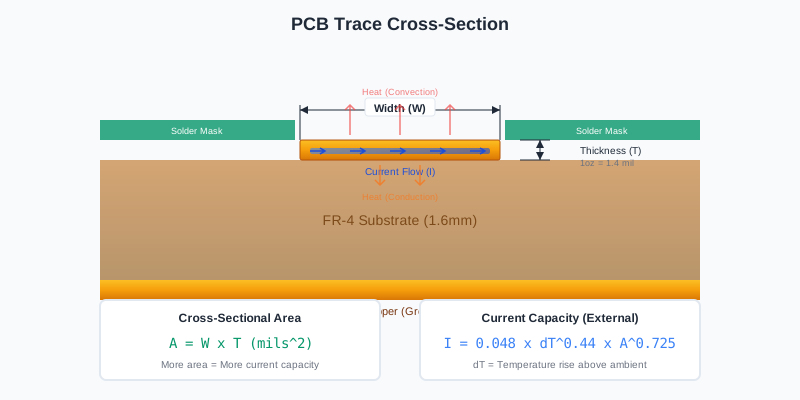
- A = Cross-sectional area in mils² (width × thickness)
IPC-2152: The Modern Standard
IPC-2152 (Standard for Determining Current Carrying Capacity in Printed Board Design) was released in 2009 based on extensive testing by the Naval Surface Warfare Center. It includes:
- Modern FR-4 materials and manufacturing processes
- Effects of copper planes near traces
- Environmental factors (airflow, enclosure)
- More accurate predictions for today's PCBs
Which Standard to Use?
For most hobby and commercial projects, IPC-2221 is still widely used and provides conservative estimates. Use IPC-2152 when you need more accurate predictions, especially for high-current designs or boards with copper pours.
3. The Trace Width Formula
To calculate trace width, we need to solve the IPC-2221 formula for width. Here's the step-by-step derivation:
Step 1: Calculate required cross-sectional area
A = (I / (k × ΔT^0.44))^(1/0.725)
Step 2: Calculate trace width
Width (mils) = A / (Thickness × 1.378)
Where:
- k = 0.048 for external layers
- k = 0.024 for internal layers
- Thickness in oz/ft² (1 oz = 1.378 mils)
Simplified Formula for 1oz Copper
For the common case of 1oz copper with 10°C temperature rise:
External Layer: Width (mils) ≈ I^1.378 × 10.5
Internal Layer: Width (mils) ≈ I^1.378 × 21
This approximation is accurate within 10% for currents from 0.5A to 10A.
4. Complete Trace Width Tables
These tables provide quick reference values based on IPC-2221. Use them as a starting point, then verify with a calculator.
External Layer - 1oz Copper (35μm / 1.4 mils)
| Current | 10°C Rise | 20°C Rise | 30°C Rise |
|---|---|---|---|
| 0.5A | 5 mil (0.13mm) | 3 mil (0.08mm) | 2.5 mil (0.06mm) |
| 1A | 10 mil (0.25mm) | 7 mil (0.18mm) | 5 mil (0.13mm) |
| 2A | 30 mil (0.76mm) | 20 mil (0.51mm) | 15 mil (0.38mm) |
| 3A | 50 mil (1.27mm) | 35 mil (0.89mm) | 25 mil (0.64mm) |
| 4A | 80 mil (2.03mm) | 55 mil (1.40mm) | 40 mil (1.02mm) |
| 5A | 110 mil (2.79mm) | 75 mil (1.91mm) | 60 mil (1.52mm) |
| 7A | 175 mil (4.45mm) | 120 mil (3.05mm) | 95 mil (2.41mm) |
| 10A | 300 mil (7.62mm) | 200 mil (5.08mm) | 160 mil (4.06mm) |
Internal Layer - 1oz Copper (35μm / 1.4 mils)
| Current | 10°C Rise | 20°C Rise | 30°C Rise |
|---|---|---|---|
| 0.5A | 15 mil (0.38mm) | 10 mil (0.25mm) | 8 mil (0.20mm) |
| 1A | 35 mil (0.89mm) | 22 mil (0.56mm) | 17 mil (0.43mm) |
| 2A | 90 mil (2.29mm) | 60 mil (1.52mm) | 45 mil (1.14mm) |
| 3A | 160 mil (4.06mm) | 105 mil (2.67mm) | 80 mil (2.03mm) |
| 4A | 240 mil (6.10mm) | 160 mil (4.06mm) | 125 mil (3.18mm) |
| 5A | 330 mil (8.38mm) | 220 mil (5.59mm) | 175 mil (4.45mm) |
Important Note
Internal layers require approximately 2-3x wider traces than external layers for the same current. This is because internal layers have no air cooling and rely entirely on conduction through the PCB substrate.
5. Copper Weight and Thickness
Copper weight (measured in oz/ft²) directly affects current carrying capacity. Heavier copper = more cross-sectional area = more current.
Copper Weight Conversion Table
| Weight (oz) | Thickness (mils) | Thickness (μm) | Thickness (mm) | Current Multiplier |
|---|---|---|---|---|
| 0.5 oz | 0.7 mil | 17.5 μm | 0.0175 mm | 0.6x |
| 1 oz (Standard) | 1.4 mil | 35 μm | 0.035 mm | 1.0x (Baseline) |
| 2 oz | 2.8 mil | 70 μm | 0.070 mm | 1.65x |
| 3 oz | 4.2 mil | 105 μm | 0.105 mm | 2.2x |
| 4 oz | 5.6 mil | 140 μm | 0.140 mm | 2.7x |
Pro Tip: When to Use Heavy Copper
Consider 2oz copper for power electronics, motor drivers, or any design carrying >3A. The cost increase is typically 10-20%, but you'll get significantly narrower traces and better thermal performance. JLCPCB offers 2oz copper as a standard option.
6. Internal vs External Layers
The location of your trace dramatically affects its current capacity. Understanding why helps you make better design decisions.
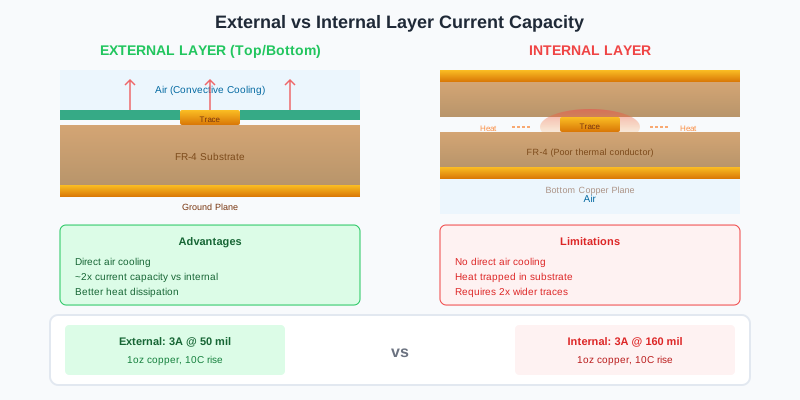
External Layers (Top & Bottom)
- Better cooling - Direct contact with air allows convective heat dissipation
- Can carry ~2x more current than equivalent internal traces
- Affected by enclosure - Still air in enclosures reduces capacity by 10-20%
- Copper planes help - Adjacent copper pours act as heat spreaders
Internal Layers
- Trapped heat - No direct air contact, heat must conduct through FR-4
- Lower capacity - Approximately 50% of external layer capacity
- Thermal vias help - Add vias to conduct heat to external layers
- Plane proximity matters - Traces near power/ground planes cool better
7. Temperature Rise Considerations
Temperature rise (ΔT) is how much hotter the trace gets compared to ambient. This is a critical design parameter.
Choosing Temperature Rise
| ΔT | Use Case | Trade-offs |
|---|---|---|
| 10°C | Conservative, consumer electronics, high reliability | Widest traces, most reliable |
| 20°C | Industrial, moderate power, good balance | ~30% narrower traces than 10°C |
| 30°C | Space-constrained, short duty cycle | ~45% narrower, reduced reliability |
| >30°C | Not recommended | Risk of delamination, component damage |
Ambient Temperature Considerations
Don't forget about ambient temperature! If your device operates in a hot environment:
Maximum Trace Temperature = Ambient + ΔT
Example:
- Ambient: 50°C (hot enclosure)
- ΔT: 20°C (from calculation)
- Trace temperature: 70°C
FR-4 Glass Transition (Tg): 130-180°C (safe!)
Nearby component limits: Check IC specs (typically 85-105°C max)
8. How to Use a Trace Width Calculator
Online trace width calculators automate the IPC-2221 formula. Here's how to use them effectively.
Required Inputs
- Current (Amps) - Use your maximum expected current, including transients
- Copper Weight (oz) - Usually 1oz unless specified otherwise
- Temperature Rise (°C) - Start with 10°C for conservative design
- Trace Layer - External (top/bottom) or Internal
- Trace Length (optional) - For voltage drop calculations
Step-by-Step Example
Let's design a trace for a 12V motor driver drawing 3A peak:
Given:
- Current: 3A (peak motor current)
- Copper: 1oz (standard PCB)
- Temperature rise: 10°C (conservative)
- Layer: External (top layer)
- Trace length: 50mm
Calculator Output:
- Required width: 50 mil (1.27mm)
- Resistance: 0.035Ω
- Voltage drop: 0.105V (0.9% of 12V)
- Power dissipation: 0.315W
Recommended Calculators
- Saturn PCB Toolkit - Free Windows software with comprehensive tools
- 4PCB Trace Width Calculator - Simple online tool
- EEWeb Calculator - Browser-based with both IPC standards
- Altium Designer - Built-in calculator (licensed)
9. Practical Design Examples
Example 1: USB-Powered Device
Requirement: USB 2.0 power (500mA max)
Calculation:
- Current: 0.5A
- 1oz copper, external, 10°C rise
- Result: 5 mil (0.13mm)
Recommendation: Use 10 mil (0.25mm) minimum
Reason: Manufacturing reliability, voltage drop reduction
Example 2: 5V/2A Power Supply
Requirement: 5V rail for development board
Calculation:
- Current: 2A continuous
- 1oz copper, external, 10°C rise
- Result: 30 mil (0.76mm)
Recommendation: Use 40 mil (1.0mm)
Reason: Allow for transients, future expansion
Example 3: Motor Driver (High Current)
Requirement: 24V/10A motor driver
Calculation:
- Current: 10A continuous (15A stall)
- 2oz copper, external, 20°C rise
- Result for 10A: 115 mil (2.9mm)
- Result for 15A (stall): 200 mil (5.1mm)
Recommendation:
- Use copper pours for power paths
- Add thermal vias to spread heat
- Consider 4oz copper for extreme current
Example 4: Battery-Powered IoT Device
Requirement: 3.7V LiPo, 100mA average, 500mA peak (WiFi TX)
Calculation:
- Design for peak: 500mA
- 1oz copper, external, 10°C rise
- Result: 5 mil (0.13mm)
Recommendation: Use 8 mil (0.2mm) for all power traces
Reason: Manufacturing margin, lower IR drop for battery life
10. Common Mistakes to Avoid
Mistake #1: Using Signal Trace Width for Power
Problem: Routing VCC with 6 mil traces because "it's just a connection"
Solution: Always calculate trace width based on current, not function. A 1A power trace needs 10+ mils.
Mistake #2: Ignoring Return Path
Problem: Wide VCC trace but thin GND trace
Solution: The return path (usually GND) carries the same current. Size both traces equally or use a ground plane.
Mistake #3: Not Accounting for Transients
Problem: Designing for 2A average when motor stalls at 8A
Solution: Design for worst-case current: inrush, motor stall, short circuit protection trip current.
Mistake #4: Necking Down at Vias
Problem: 50 mil trace reducing to 10 mil at via connection
Solution: Use multiple vias in parallel, or larger via pads. The neck becomes the current bottleneck.
Mistake #5: Forgetting About Internal Layers
Problem: Routing 5A on internal layer with same width as external
Solution: Internal traces need ~2x the width. Use external layers for high-current paths when possible.
Mistake #6: Ignoring Voltage Drop
Problem: Long 10 mil trace causing 0.5V drop on 3.3V rail
Solution: Calculate voltage drop for long traces: V = I × R. Keep drop under 2-3% of rail voltage.
11. Best Practices and Rules of Thumb
Quick Reference Rules
- 1.10 mils per amp - Quick approximation for 1oz copper, external, 10°C rise
- 2.Double for internal - Internal layers need 2x the trace width
- 3.Add 50% margin - Always design with safety margin for transients
- 4.Use copper pours - For currents above 3A, consider polygon pours instead of traces
- 5.Check voltage drop - Long traces or low voltages need wider traces for IR drop
- 6.Mind the return path - GND traces carry the same current as power
When to Use Copper Pours Instead of Traces
- Current exceeds 5A continuous
- Need significant heat dissipation
- Multiple parallel loads sharing a power rail
- Space isn't constrained
- EMI/EMC requirements need solid planes
Thermal Via Strategy
For high-current designs, thermal vias help dissipate heat from internal layers:
- Place vias along the trace length, not just at endpoints
- Use 0.3mm drill vias, 0.6mm pad - standard and cheap
- Spacing: 1-2mm apart along trace
- Connect to copper pour on opposite side to act as heatsink
12. JLCPCB Manufacturing Limits
When designing for JLCPCB (or similar low-cost manufacturers), keep these limits in mind:
| Parameter | Standard (Free) | Advanced ($$$) |
|---|---|---|
| Minimum Trace Width | 6 mil (0.15mm) | 3.5 mil (0.09mm) |
| Minimum Trace Spacing | 6 mil (0.15mm) | 3.5 mil (0.09mm) |
| Copper Weight | 1oz / 2oz | Up to 6oz |
| Via Drill Size | 0.3mm minimum | 0.15mm minimum |
| Max Board Thickness | 2.0mm | 4.0mm |
EasyEDA Integration Tip
When using EasyEDA with JLCPCB, the design rules are automatically set to JLCPCB's standard capabilities. Check Design → Design Rule Check to verify your trace widths meet manufacturing requirements before ordering.
Summary: Trace Width Selection Flowchart
- Determine maximum current - Include transients, startup, worst-case
- Choose copper weight - 1oz standard, 2oz for >3A
- Select temperature rise - 10°C conservative, 20°C typical
- Identify layer - External preferred for high current
- Calculate using IPC-2221 - Use tables or calculator
- Add safety margin - Minimum 50%, more for critical paths
- Check voltage drop - For long traces or low voltages
- Verify DRC - Ensure meets manufacturer minimums
Ready to Analyze Your PCB Design?
Schemalyzer can automatically review your EasyEDA schematics for trace width issues, component connections, and design rule violations. Upload your design for instant AI-powered analysis.
Try Schemalyzer Free