Introduction
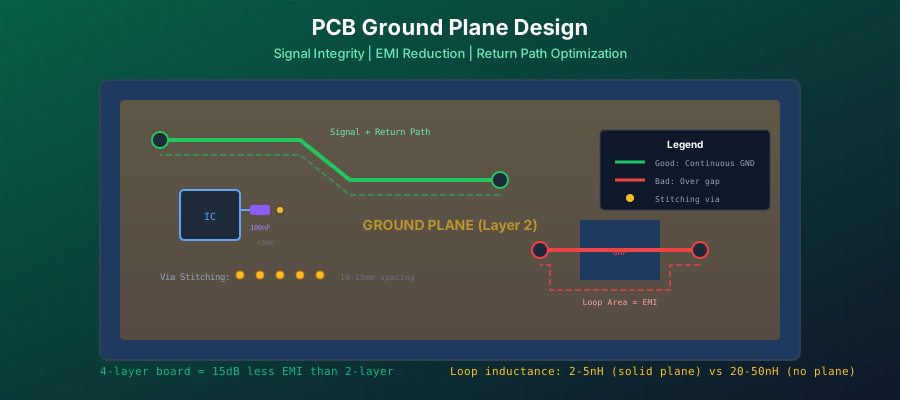
The ground plane is arguably the most critical element of modern PCB design. A well-designed ground plane ensures signal integrity, reduces electromagnetic interference (EMI), provides thermal management, and creates stable power distribution. Yet it remains one of the most misunderstood aspects of PCB layout.
Many designers treat the ground plane as an afterthought - simply flooding unused areas with copper. This approach leads to failed EMC testing, mysterious noise issues, and boards that work on the bench but fail in production. The reality is that ground plane design requires as much attention as signal routing.
This comprehensive guide covers everything you need to know about PCB ground planes: from the fundamental physics of return currents to advanced techniques for high-speed and mixed-signal designs. Whether you are designing a simple 2-layer board or a complex 8-layer system, these principles will help you create robust, EMC-compliant designs.
What is a PCB Ground Plane?
A PCB ground plane is a large area of copper connected to the circuit ground reference. It can occupy an entire layer in a multilayer board, or represent a significant portion of a single-layer design. Unlike narrow ground traces that create long, inductive return paths, a ground plane provides a low-impedance, wide-area reference for all signals and power.
Think of the ground plane as a highway system for return currents. Without it, return currents must take narrow back roads (traces), causing traffic jams (high inductance), delays (signal integrity issues), and pollution (EMI). With a proper ground plane, return currents have unlimited lanes to travel, resulting in smooth, efficient operation.
Four Critical Functions of Ground Planes
A properly designed ground plane serves four essential functions in your PCB:
1. Return Path for Signal Currents
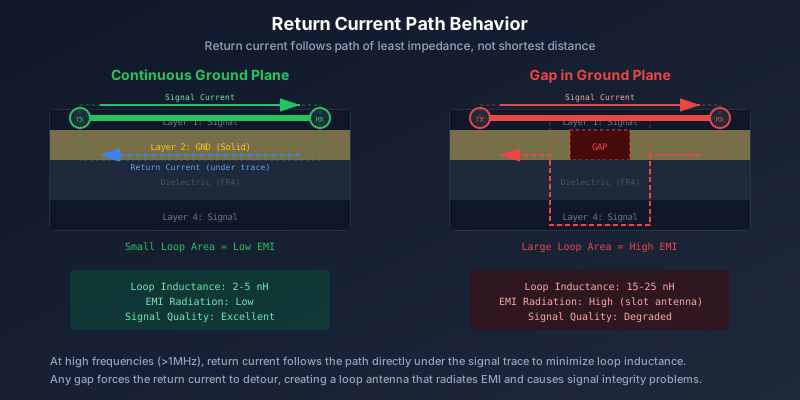
Every signal trace needs a return path for its current. The ground plane provides this path with minimal inductance. At high frequencies, the return current naturally flows directly beneath the signal trace through displacement current in the dielectric, creating a tight, low-inductance loop.
2. Impedance Control Reference
High-speed signals require controlled impedance (typically 50 ohms single-ended or 90-100 ohms differential). The ground plane provides the reference for microstrip and stripline transmission lines, enabling predictable impedance through careful control of trace width and dielectric height.
3. EMI Shielding
Ground planes act as electromagnetic shields, reducing both emissions from your board and susceptibility to external interference. A continuous ground plane can improve EMI performance by 15dB compared to a board without one.
4. Power Stability (Decoupling Capacitance)
When paired with a closely-spaced power plane, the ground plane forms a large distributed capacitor. This plane capacitance helps stabilize power delivery and reduces high-frequency noise in the power distribution network (PDN).
Understanding Return Paths
The most important concept in ground plane design is understanding how return currents flow. This single principle, properly understood, explains most ground plane rules and helps you make intelligent design decisions.
How Return Current Flows
A common misconception is that return current takes the shortest path back to its source. In reality, return current takes the path of lowest impedance, which varies with frequency:
- At DC and low frequencies - Return current follows the path of lowest resistance, spreading throughout the ground plane
- At high frequencies (above ~1 MHz) - Return current follows the path of lowest inductance, which means it flows directly under the signal trace
This frequency-dependent behavior occurs because impedance is Z = R + jwL. At low frequencies, resistance (R) dominates. At high frequencies, the inductive reactance (jwL) dominates, and the current seeks to minimize loop area to reduce inductance.
Why This Matters
If there is no copper directly beneath a high-speed signal trace, the return current must detour around the gap. This creates a large loop area, increasing inductance, causing signal reflections, and radiating EMI. A single gap in your ground plane under a critical signal can cause EMC failure.
Minimizing Loop Inductance
Loop inductance is the key metric for ground plane performance. Lower loop inductance means:
- Cleaner signal edges with less overshoot/undershoot
- Lower radiated emissions (better EMC)
- Better power integrity with less voltage droop
- Reduced ground bounce
A poorly designed ground plane might have loop inductance of 10-20 nH per signal. A well-designed ground plane with solid reference can reduce this to under 5 nH, improving performance significantly.
| Configuration | Typical Loop Inductance | EMI Performance |
|---|---|---|
| Ground trace (no plane) | 20-50 nH | Poor |
| Ground grid (2-layer) | 10-20 nH | Moderate |
| Solid ground plane (4+ layer) | 2-5 nH | Good |
| Dual ground planes (8 layer) | 1-3 nH | Excellent |
Ground Plane Layer Stackup Strategies
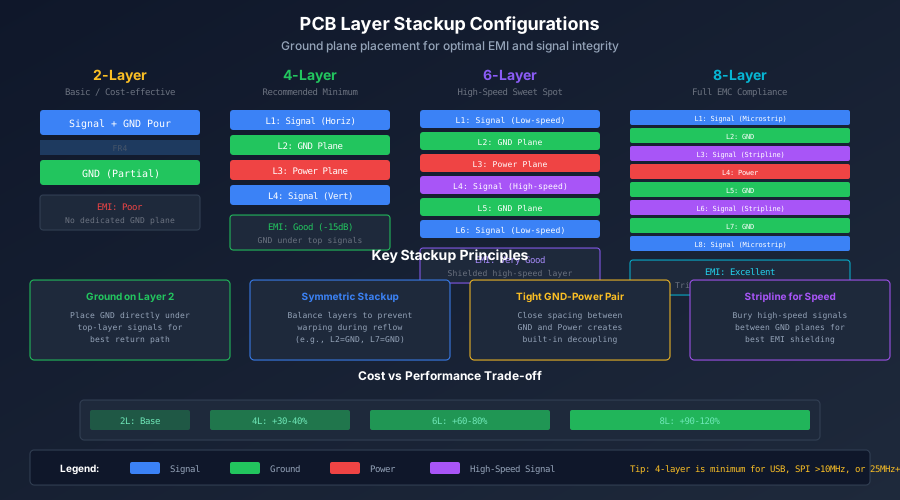
The layer stackup determines where ground planes sit in your PCB and how effectively they serve signal and power integrity. Each additional layer count tier enables better ground plane configurations.
2-Layer Board Ground Strategies
Two-layer boards present the greatest challenge for ground plane design because signals and ground must share limited space. Strategies include:
- Ground pour on bottom layer - Dedicate as much of the bottom layer as possible to ground, routing signals on top
- Ground grid pattern - Create a grid of ground traces when a solid pour is not possible. Grid spacing should be less than 1/10th wavelength of highest frequency
- Thick ground traces - Use 50+ mil (1.25mm) traces for ground to reduce resistance and inductance
2-Layer Limitation
Even with best practices, 2-layer boards produce approximately 15dB more radiation than 4-layer boards with dedicated ground planes. For any design with high-speed signals (USB, SPI at 10+ MHz, or clocks above 25 MHz), consider upgrading to 4 layers.
4-Layer Board: The Minimum for Quality
A 4-layer board allows dedicated ground and power planes, dramatically improving EMI and signal integrity. The recommended stackup is:
This stackup places ground directly beneath top-layer signals, providing excellent return path continuity. The power plane on Layer 3 pairs with ground on Layer 2 to form plane capacitance for power stability.
Avoid This Common Mistake
Do NOT use Signal-GND-GND-Signal or Signal-Power-GND-Signal stackups. The first provides no power plane capacitance. The second places power far from top signals with no local return path, and signals routing from Layer 1 to Layer 4 will have broken return paths.
6-Layer Board: The Sweet Spot
A 6-layer board adds two signal layers between the planes, enabling buried high-speed routing with excellent shielding. Recommended stackup:
This provides shielded high-speed signal routing on Layer 4, with ground planes on both sides. The tight L2-L3 spacing creates excellent plane capacitance, while dual ground planes ensure every signal has a nearby reference.
8-Layer Board: Full EMC Compliance
An 8-layer board is the minimum to achieve all EMC objectives without compromise. It provides two dedicated ground planes, a power plane, and multiple shielded signal layers.
Key benefits of 8-layer stackup:
- Three ground planes provide redundant references
- All signal layers have adjacent ground reference
- Stripline routing on L3 and L6 is fully shielded
- Tightly coupled power-ground pair in center
Cost Consideration
Moving from 4 to 6 layers typically increases cost by 30-40%. Moving from 6 to 8 adds another 30-40%. However, the cost of a single EMC failure (respin + retest + delays) often exceeds the cost difference for an entire production run.
Maintaining Ground Plane Continuity
The most important rule for ground plane design is maintaining continuity. Any break, gap, or split in the ground plane forces return currents to detour, creating large loop areas that radiate EMI and degrade signal integrity.
Why Split Ground Planes Fail
The practice of splitting ground planes into analog and digital sections is one of the most persistent myths in PCB design. While the intention - isolating noisy digital circuits from sensitive analog - is valid, the implementation almost always causes more problems than it solves.
Here is why split ground planes fail:
- Return path disruption - When signals must route across the split (which is inevitable for ADC/DAC connections), the return current has no direct path. It must flow around the split, creating a massive loop antenna.
- Slot antenna effect - The gap between split planes acts as a slot antenna, efficiently radiating at frequencies where the slot length approaches half a wavelength.
- Increased impedance - The narrow connection point between split planes (if connected at all) creates high impedance at that location, defeating the purpose of a low-impedance ground.
Industry Consensus
Major semiconductor manufacturers including Analog Devices, Texas Instruments, and Linear Technology (now part of ADI) recommend using a single, solid ground plane for most mixed-signal designs. Splits should only be considered for very high-precision systems with multiple high-current digital buses.
Routing Discipline Over Ground
Instead of splitting the ground plane, achieve analog-digital isolation through careful component placement and routing discipline:
- Physical separation - Place analog components in one area, digital in another, but over a continuous ground plane
- Route on correct side - Keep analog signals in the analog section, digital signals in the digital section, on all layers
- Never cross the invisible boundary - Imagine a line between sections. No signal should cross it except the necessary ADC/DAC data lines
- Return path awareness - When signals must connect between sections, ensure their return current stays in the same section (use nearby ground vias)
This approach allows return currents to flow naturally under their signal traces without disruption, while still maintaining effective isolation between circuit sections.
Via Stitching and Ground Connections
Via stitching connects ground planes on different layers, creating a three-dimensional ground structure. When done correctly, stitching vias reduce EMI, improve thermal performance, and maintain return path continuity.
When Via Stitching is Required
Via stitching is essential in these situations:
- Around board edges - Creates a ground perimeter that reduces edge radiation and provides a path for ESD current
- Around sensitive circuits - Forms a via fence that shields RF sections, oscillators, and high-gain amplifiers
- Between multiple ground layers - Ensures all ground planes are at the same potential
- In copper pours - Connects surface ground pours to internal ground planes
Via Spacing Guidelines
The spacing between stitching vias depends on your highest operating frequency:
| Application | Frequency | Via Spacing |
|---|---|---|
| General digital | <100 MHz | 10-15 mm |
| High-speed digital | 100-500 MHz | 5-10 mm |
| RF (2.4 GHz) | 2.4 GHz | <3 mm (1/10 wavelength) |
| Microwave | >5 GHz | <1.5 mm |
The rule of thumb: via spacing should be less than 1/10th the wavelength at your highest frequency of interest. This makes the via fence appear solid to electromagnetic waves.
Ground Vias for Layer Transitions
When a signal trace changes layers using a via, its return current must also change layers. This requires a nearby ground via to maintain return path continuity.
Best Practice
Place a ground via within 2-3 via diameters of every signal via transition. For high-speed signals (USB, Ethernet, DDR), place ground vias on both sides of the signal via. This ensures return current has an immediate path to follow the signal to the new layer.
Failing to provide return path vias forces the return current to find another path, potentially flowing across the entire board to reach the next ground connection. This creates a large loop area and radiates EMI.
Mixed-Signal Ground Design
Mixed-signal boards containing both analog and digital circuits present unique grounding challenges. The key is preventing digital switching noise from corrupting sensitive analog measurements while maintaining proper return paths.
The Single Solid Ground Plane Approach
For most mixed-signal designs with low to moderate digital current (single ADC/DAC with typical microcontroller), the best approach is a single, unbroken ground plane with careful layout:
- Keep analog and digital currents separate through layout - Return currents naturally flow under their signal traces. If you keep analog signals in the analog area, their return currents stay there too.
- Star point at ADC/DAC - Connect AGND and DGND pins at the IC as recommended by the manufacturer. Do not separate these connections.
- Single point power entry - All power should enter the board at one location, with separate regulation for analog and digital rails if needed.
Component Partitioning Strategy
The key to successful mixed-signal design is component partitioning - organizing your board into distinct regions without physically splitting the ground plane:
Analog Region
- ADC/DAC reference circuits
- Precision amplifiers
- Sensor interfaces
- Analog filters
Digital Region
- Microcontroller
- Memory
- Communication interfaces
- Digital I/O
Power Region
- Switching regulators
- Power MOSFETs
- Bulk capacitors
Keep the power region away from sensitive analog circuits, as switching regulators are major EMI sources. The digital and analog regions can be adjacent but should have a clear boundary that signals cross only when necessary.
When Star Grounding Makes Sense
Star grounding - connecting separate ground regions to a single common point - is appropriate only in specific situations:
- Very low frequency analog (<100 kHz) - Audio equipment, precision instrumentation where DC offset matters
- High-power mixed systems - Motor drives sharing a board with sensitive analog
- Galvanically isolated systems - Where safety isolation requires separate grounds
Warning
If you use star grounding, you must NEVER route signals across the gap between ground regions. The only connection between regions should be through the star point. Any signal crossing creates a large EMI loop. This is why star grounding rarely works in modern mixed-signal designs with high-speed interfaces.
Copper Pour and Ground Fill
Copper pours (also called ground fills or floods) fill unused PCB areas with copper connected to ground. When done correctly, they improve EMI performance and thermal dissipation. When done incorrectly, they create more problems than they solve.
Ground Pour Best Practices
- Always connect pours to ground - Never leave copper floating. Floating copper acts as an antenna and can couple noise into nearby signals.
- Stitch pours to ground planes - Use vias every 10-15mm to connect surface pours to internal ground planes
- Maintain clearance to signals - Keep at least 2x trace width clearance between pour and signal traces to avoid capacitive coupling
- Remove small isolated islands - Set your EDA tool to remove copper islands smaller than 1mm squared (they serve no purpose and complicate manufacturing)
Avoiding Floating Copper Islands
Floating copper - copper not connected to any net - is a significant EMI hazard. It can:
- Capacitively couple noise between signals
- Resonate at specific frequencies, amplifying noise
- Act as an antenna, radiating or receiving interference
Common causes of floating copper:
- Copper islands created by routing that cuts off part of a pour
- Pours in areas with no ground via connection
- Incorrectly configured pour-to-net assignments
EasyEDA/KiCad Tip
Run a DRC check specifically looking for unconnected copper. Most EDA tools can identify floating copper islands. In EasyEDA, use Design -> Check DRC and look for "Copper area not connected" warnings. Remove or connect these islands before manufacturing.
Ground Planes for High-Speed Design
High-speed signals (USB, HDMI, DDR, PCIe, Ethernet) have stringent ground plane requirements. The ground plane is not just a return path - it is an integral part of the transmission line that defines signal impedance and quality.
Impedance Control with Ground Reference
Controlled impedance transmission lines require a consistent ground reference. The impedance depends on:
- Trace width (W) - Wider traces have lower impedance
- Dielectric height (H) - Distance from trace to ground plane
- Dielectric constant (Er) - Material property, typically 4.2-4.8 for FR4
- Copper thickness (T) - Typically 1oz (35um) or 2oz (70um)
| Interface | Single-Ended (ohm) | Differential (ohm) |
|---|---|---|
| USB 2.0 | - | 90 |
| USB 3.0 | - | 90 |
| HDMI | - | 100 |
| DDR4 | 40 | 80 |
| Ethernet (10/100) | - | 100 |
| General single-ended | 50 | - |
Any discontinuity in the ground plane beneath a controlled-impedance trace creates an impedance discontinuity, causing signal reflections and degraded signal quality. Even a small gap can cause an impedance spike of 10-20%, exceeding the typical +/-10% tolerance.
Microstrip vs Stripline
The two primary transmission line types have different ground plane requirements:
Microstrip
- Signal on outer layer
- Ground plane on adjacent inner layer
- Exposed to air (lower Er effective)
- Easier to manufacture
- Less shielding, more EMI
Stripline
- Signal on inner layer
- Ground planes above AND below
- Embedded in dielectric
- Better shielding, lower EMI
- Requires more layers
For best EMI performance, route high-speed signals as striplines between ground planes. This requires at least a 6-layer board. If using 4 layers, microstrip on Layer 1 with ground on Layer 2 is acceptable but will have higher EMI.
Ground Bounce and SSN Mitigation
Ground bounce occurs when many outputs switch simultaneously, causing transient voltage differences between IC ground and PCB ground. Simultaneous Switching Noise (SSN) is the system-level manifestation of this effect.
Ground bounce causes:
- False logic transitions
- Timing errors (setup/hold violations)
- Increased jitter
- EMI radiation
Mitigation strategies:
- Decoupling capacitors - Place 100nF capacitors within 3mm of every power pin. Add 1-10uF bulk capacitors nearby.
- Multiple ground pins - Connect every ground pin directly to the ground plane. Never daisy-chain ground pins.
- Staggered switching - If possible, offset output switching times by even 1ms to reduce simultaneous current demand.
- Low-inductance packages - BGA packages have much lower inductance than QFP due to shorter bond wires.
- Use LVDS - Low-voltage differential signaling has constant current draw regardless of logic state, eliminating switching transients.
Thermal Considerations
Ground planes serve as heat sinks, spreading thermal energy across the PCB. Proper thermal design ensures components stay within operating temperature while maintaining electrical performance.
Thermal Relief Pads
When component pads connect to large copper planes, the plane acts as a heat sink during soldering, making it difficult to achieve proper solder joints. Thermal relief pads solve this by using narrow spokes to connect the pad to the plane:
- Use thermal relief for through-hole pads - All through-hole pins connecting to planes should use thermal relief
- SMD pads: depends on application - For most SMD pads, use thermal relief. For high-current pads that need low resistance, use solid connections.
- Vias generally do not need thermal relief - Since vias are not soldered, solid connections are preferred for low impedance
Typical Thermal Relief Settings
- Spoke width: 8-12 mil (0.2-0.3mm)
- Number of spokes: 4 (90 degrees apart)
- Gap width: 10-15 mil (0.25-0.4mm)
- Antipad diameter: Pad diameter + 2x gap
Thermal Vias to Ground Planes
Thermal vias transfer heat from component thermal pads to internal ground planes and opposite-side copper, significantly improving thermal performance:
- Via diameter - 0.2-0.4mm (8-16 mil). Smaller for dense layouts, larger for better thermal transfer.
- Via spacing - 1-1.2mm (40-48 mil) center-to-center to prevent solder wicking during reflow
- Via quantity - For a 5W component, use at least 4-6 vias of 0.3mm diameter. This can reduce local temperatures by 20 degrees C.
- Connection - Thermal vias should connect to ground planes with solid connections (no thermal relief) for best heat transfer
Calculation Example
A thermal via with 0.3mm drill, 1oz plating (25um) has approximately 70-100 degrees C/W thermal resistance. Five such vias in parallel provide roughly 15-20 degrees C/W, enabling effective heat transfer to internal planes.
Ground Planes for RF and Antennas
RF circuits and antennas have specific ground plane requirements that differ from standard digital designs. The ground plane is not just a reference - it is part of the radiating structure.
Antenna Ground Plane Requirements
For monopole antennas (like chip antennas for WiFi/Bluetooth), the PCB ground plane acts as the second element of a dipole. Proper ground plane sizing is critical:
| Frequency | Wavelength | Min Ground Plane Size |
|---|---|---|
| 2.4 GHz (WiFi/BT) | 125mm | 35mm x 35mm |
| 915 MHz (LoRa) | 328mm | 82mm x 82mm |
| 433 MHz | 693mm | 173mm x 173mm |
The ground plane should extend at least 1/4 wavelength from the antenna feed point in all directions. For a 2.4 GHz chip antenna, this means at least 35mm of solid ground plane behind and beside the antenna.
RF Keep-Out Zones
The area directly beneath and around an antenna must be free of copper on all layers:
- Under the antenna - Complete copper-free zone on all layers. No ground, no power, no traces.
- Antenna ends - Extend the keep-out 3-5mm beyond the antenna element edges
- Via stitching - Place stitching vias along the edge of the ground plane near the antenna, spaced at less than 1/10 wavelength (about 1.25mm for 2.4 GHz)
Common RF Mistake
Placing components, traces, or copper pour in the antenna keep-out zone is the number one cause of poor wireless performance. Always follow the antenna manufacturer recommended keep-out dimensions exactly. When in doubt, make the keep-out larger.
Common Ground Plane Mistakes
Avoid these frequent ground plane design errors that cause EMI failures and signal integrity problems:
1. Routing signals over ground plane gaps
Any signal routed over a gap forces return current to detour, creating a large loop antenna. Even a small gap can cause EMC failure.
2. Splitting ground planes for analog/digital isolation
This almost always makes EMI worse. Use partitioning and routing discipline instead of physical splits.
3. Leaving floating copper islands
Unconnected copper acts as an antenna. Either connect it to ground with vias or remove it entirely.
4. Missing return path vias at layer transitions
Every signal via needs a nearby ground via for return current. Place ground vias within 2-3 via diameters of signal vias.
5. Insufficient via stitching
Ground pours not stitched to internal planes provide no benefit. Use vias every 10-15mm (more frequently for RF).
6. Ground plane on wrong layer in stackup
Ground should be on Layer 2 (directly beneath top signals), not Layer 3. The Signal-Power-Ground-Signal stackup is problematic.
7. Daisy-chaining IC ground pins
Each ground pin should connect directly to the ground plane via its own via. Daisy chaining increases inductance and ground bounce.
8. Copper in antenna keep-out zone
Any copper under or immediately around an antenna degrades performance. Follow manufacturer keep-out specifications exactly.
Ground Plane Design Checklist
Use this checklist to verify your ground plane design before sending for manufacturing:
Layer Stackup
- Ground plane on Layer 2 (adjacent to top signal layer)
- Stackup is symmetrical (balanced)
- Power and ground planes are closely spaced (for capacitance)
- All signal layers have adjacent ground reference
Continuity
- Ground plane is continuous (no splits unless galvanic isolation required)
- No signals routed over ground plane gaps
- No floating copper islands (all copper connected or removed)
Via Stitching
- Ground vias placed near all signal vias (within 2-3 diameters)
- Ground pours stitched to internal planes (every 10-15mm)
- Board edge has via fence for EMI containment
- RF sections have dense via stitching (1/10 wavelength spacing)
High-Speed Signals
- Controlled impedance traces have continuous ground reference
- Differential pairs have ground between them and to sides
- High-speed signals do not cross plane splits
Power Integrity
- Each IC ground pin connected directly to ground plane
- Decoupling capacitors within 3mm of IC power pins
- Decoupling capacitor ground vias adjacent to capacitor
Thermal
- Thermal relief pads on through-hole connections to planes
- Thermal vias under power components (4-6 minimum for 5W+)
RF/Antenna (if applicable)
- Antenna keep-out zone clear on all layers
- Ground plane extends 1/4 wavelength from antenna
- Via stitching at ground plane edge near antenna
Conclusion
The ground plane is the foundation of every successful PCB design. It provides the return path for all signals, establishes impedance for high-speed traces, shields against EMI, and stabilizes power distribution. Getting it right requires understanding how return currents actually flow - they follow the path of least inductance, not the shortest distance.
Key principles to remember:
- Maintain continuity - A continuous ground plane is almost always better than a split one. Use routing discipline for isolation, not physical gaps.
- Think in 3D - Use via stitching to connect ground planes across layers and maintain return paths through layer transitions.
- Plan your stackup - Ground on Layer 2 adjacent to top signals is critical. Consider 6+ layers for high-speed designs.
- Support every signal - Every trace needs a ground reference beneath it. No exceptions for high-speed signals.
By following the guidelines in this article, you will create boards that pass EMC testing, maintain signal integrity, and work reliably in production. The time invested in proper ground plane design pays dividends in reduced debugging, fewer respins, and better product performance.
Frequently Asked Questions
Should I use a ground plane on a 2-layer board?
Yes, dedicate as much of the bottom layer as possible to ground. While you cannot achieve a truly continuous plane with signals also on that layer, maximizing ground coverage significantly improves EMI. Use ground pours in unused areas on the top layer as well, stitched to bottom ground where possible.
When should I split the ground plane for analog and digital?
Almost never. Modern best practice is to use a single solid ground plane with careful component partitioning and routing discipline. Split planes cause more EMI problems than they solve because signals inevitably must cross between sections. Only consider splits for very low frequency precision analog (<100 kHz) or when galvanic isolation is required for safety.
How many vias do I need for via stitching?
Space stitching vias at 10-15mm for general designs, 5-10mm for high-speed digital, and less than 1/10th wavelength for RF (about 3mm at 2.4 GHz). More vias is generally better - the cost is minimal compared to the EMI benefits.
What happens if I route a high-speed signal over a gap in the ground plane?
The return current must detour around the gap, creating a large loop area. This causes impedance discontinuity (signal reflections), increased loop inductance, and significant EMI radiation. A single gap under a USB or Ethernet trace can cause the design to fail EMC certification.
Should I use thermal relief on all ground connections?
Use thermal relief on through-hole pads and SMD pads that will be hand soldered. For vias and pads in reflow-only assembly, solid connections are acceptable and provide better electrical and thermal performance. Never use thermal relief on thermal vias designed for heat transfer.
How close should decoupling capacitors be to IC power pins?
Within 3mm for standard digital ICs, and as close as physically possible for high-speed ICs. The capacitor ground via should be immediately adjacent to the capacitor, not several millimeters away. The loop area formed by power pin, capacitor, and ground via should be minimized.
What is the minimum ground plane size for a WiFi antenna?
For 2.4 GHz WiFi/Bluetooth, the ground plane should extend at least 35mm (approximately 1/4 wavelength) from the antenna feed in all directions where ground exists. Smaller ground planes significantly degrade antenna efficiency and range. The area directly under and around the antenna (typically 5-10mm) must be completely copper-free.
Is a 4-layer board always better than 2-layer for EMI?
Generally yes - a 4-layer board with dedicated ground plane typically has 15dB lower EMI than a 2-layer board. However, the improvement depends on proper stackup (ground on Layer 2) and not routing over ground gaps. A poorly designed 4-layer board with signal routing through the ground plane can be worse than a well-designed 2-layer board.