TL;DR
PCB design follows a clear workflow: create schematic → assign footprints → place components → route traces → run DRC → export Gerbers → order boards. Start with 2-layer boards for simple projects. Use 45° trace angles, wide power traces (0.5mm+), and always include a ground plane. Verify footprints match your components before ordering. Total cost: ~$2-10 for 5 prototype boards.
Introduction
Printed Circuit Boards (PCBs) are the foundation of modern electronics. From the smartphone in your pocket to satellites orbiting Earth, every electronic device relies on PCBs to connect components and make circuits work.
Learning to design your own PCBs opens up incredible possibilities. You can build custom electronics, prototype inventions, and turn ideas into physical products. And thanks to affordable manufacturing services, getting professional boards made costs less than a coffee.
This guide covers everything you need to know to design your first PCB—from understanding the fundamentals to getting boards manufactured and delivered to your door.
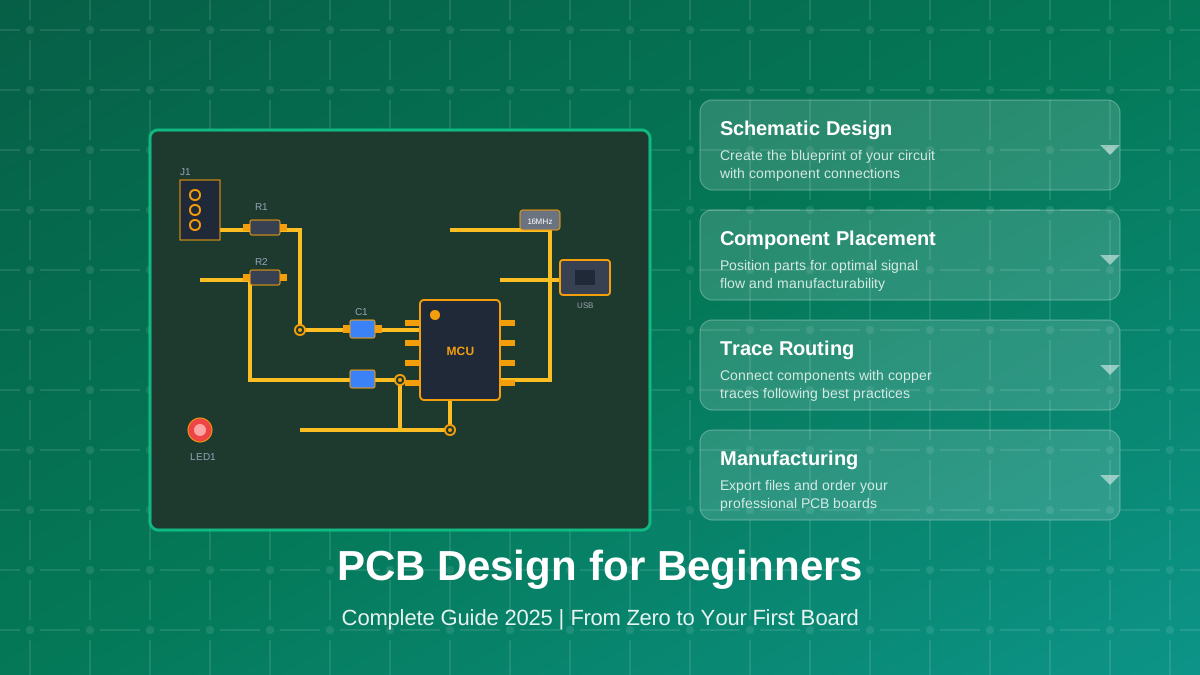
What you'll learn:
- PCB fundamentals and terminology
- Choosing the right design tools
- The complete PCB design workflow
- Layer stackups and when to use them
- Trace routing best practices
- Common mistakes and how to avoid them
- Manufacturing and ordering your boards
What is a PCB?
A Printed Circuit Board (PCB) is a flat board made of insulating material with conductive pathways etched or printed onto its surface. These pathways (called traces) connect electronic components like resistors, capacitors, and integrated circuits (ICs) to form a complete circuit.
Before PCBs, circuits were built using point-to-point wiring or breadboards—methods that were slow, error-prone, and impossible to mass produce. PCBs revolutionized electronics by enabling consistent, reliable, and scalable manufacturing.
Anatomy of a PCB
Understanding PCB anatomy is essential before you start designing. Here are the key components:

PCB Components Explained
- Substrate (FR4)
- The base material, typically fiberglass-reinforced epoxy. Standard thickness is 1.6mm. FR4 is flame-retardant (hence "FR") and provides structural support.
- Copper Layers
- Thin copper foil (typically 1oz or 35μm thick) laminated to the substrate. These form the conductive pathways. PCBs can have 1, 2, 4, or more copper layers.
- Traces
- The copper pathways that connect components. Width varies based on current requirements—wider traces carry more current without overheating.
- Pads
- Exposed copper areas where components are soldered. Through-hole pads have holes; SMD pads are flat surfaces for surface-mount components.
- Vias
- Plated holes that connect traces on different layers. Essential for multi-layer boards to route signals between top and bottom (or internal) layers.
- Solder Mask
- The colored coating (usually green) that protects copper from oxidation and prevents solder bridges. Available in various colors: green, blue, red, black, white.
- Silkscreen
- The printed text and symbols on the board surface. Includes component designators (R1, C1, U1), polarity marks, logos, and assembly information.
Types of PCBs
PCBs come in several types based on layer count and construction:
| Type | Layers | Use Cases | Cost |
|---|---|---|---|
| Single-sided | 1 | Simple circuits, power supplies | Lowest |
| Double-sided | 2 | Most hobby projects, Arduino shields | Low |
| Multi-layer | 4+ | Complex designs, high-speed, RF | Medium-High |
| Flexible | 1-6 | Wearables, cramped spaces | High |
| Rigid-Flex | 4+ | Folding devices, aerospace | Highest |
For beginners, 2-layer (double-sided) PCBs offer the best balance of capability and cost. You can route on both sides and add a ground plane, which solves most hobbyist needs.
PCB Design Tools
You need Electronic Design Automation (EDA) software to create PCBs. These tools let you draw schematics, layout boards, and generate manufacturing files. Here are the best options in 2025:
Tool Comparison
EasyEDA (Recommended for Beginners)
Free, browser-based tool with integrated JLCPCB ordering. Huge component library. Zero learning curve.
- ✓ 100% free, no restrictions
- ✓ Works on any platform
- ✓ 1M+ components with footprints
- ✓ Direct JLCPCB integration
KiCad
Free, open-source professional tool. Steeper learning curve but more powerful features.
- ✓ Free and open-source
- ✓ Professional-grade features
- ✓ Large community
- ✓ No vendor lock-in
Altium Designer
Industry standard for professionals. Expensive but feature complete. Steep learning curve.
- ✓ Industry standard
- ✓ Advanced features
- ✗ ~$5,000/year license
- ✗ Windows only
Autodesk EAGLE
Popular hobbyist choice, now owned by Autodesk. Free tier has board size limits.
- ✓ Large user community
- ✓ Good tutorials available
- ✗ Free tier limited to 2 layers
- ✗ 80cm² board size limit (free)
Our Recommendation: Start with EasyEDA if you're new to PCB design. It has the gentlest learning curve and you can go from schematic to ordered boards in an afternoon. Move to KiCad when you need more advanced features or want an offline tool.
The PCB Design Workflow
Every PCB design follows the same fundamental workflow, regardless of which tool you use. Understanding this process helps you work efficiently and avoid costly mistakes.

Step 1: Schematic Design
Everything starts with a schematic—a symbolic diagram showing how components connect electrically. The schematic is your "source of truth" and should be correct before moving to layout.
Key schematic practices:
- Use hierarchical design for complex circuits—break into functional blocks
- Add power symbols (VCC, GND) rather than drawing wires everywhere
- Label all nets with meaningful names—helps during debugging
- Include bypass capacitors near every IC power pin (typically 100nF)
- Run ERC (Electrical Rule Check) to catch connection errors
Step 2: Assign Footprints
Each schematic symbol needs a corresponding footprint—the physical pad layout for soldering. This is where many beginners make critical mistakes.
Critical Warning: Wrong footprints are the #1 cause of unusable PCBs. Always verify footprint dimensions against the component datasheet. A 0603 resistor footprint won't accept a 0805 resistor—your components simply won't fit.
Common package sizes for SMD components (metric names in parentheses):
- 0402 (1005): Tiny, requires reflow soldering
- 0603 (1608): Small, hand-solderable with practice
- 0805 (2012): Easy to hand-solder, recommended for beginners
- 1206 (3216): Large, very easy to hand solder
Step 3: Component Placement
Good placement makes routing easier and improves performance. Think about signal flow and keep related components together.
Placement Guidelines
- 1.Place connectors first at board edges for mechanical fit
- 2.Position ICs and arrange support components around them
- 3.Put bypass capacitors within 3mm of IC power pins
- 4.Separate analog and digital sections to reduce noise
- 5.Leave space for routing between components
- 6.Consider thermal management for power components
Step 4: Trace Routing
Routing connects component pads with copper traces. This is where the magic happens—your schematic becomes a physical circuit.
Most designs route in this priority order: critical signals → power → everything else. We'll cover routing best practices in detail below.
Step 5: Design Rule Check (DRC)
DRC verifies your design meets manufacturing constraints. Common rules include:
- Minimum trace width: 0.15mm (6 mil) standard
- Minimum clearance: 0.15mm between traces
- Minimum drill size: 0.3mm for vias
- Annular ring: Copper surrounding holes
Never skip DRC. Fixing errors after manufacturing is expensive—fixing them in software is free.
Step 6: Generate Gerber Files
Gerber files are the industry standard format for PCB manufacturing. Your EDA tool exports a ZIP containing:
- Copper layers (GTL, GBL for top/bottom)
- Solder mask layers (GTS, GBS)
- Silkscreen layers (GTO, GBO)
- Board outline (GKO)
- Drill file (DRL)
Upload this ZIP to your manufacturer's website, configure options (color, thickness, quantity), and order.
Understanding Layer Stackups
Layer stackup determines how copper layers and substrate are arranged in your PCB. This choice significantly impacts cost, routing difficulty, and electrical performance.
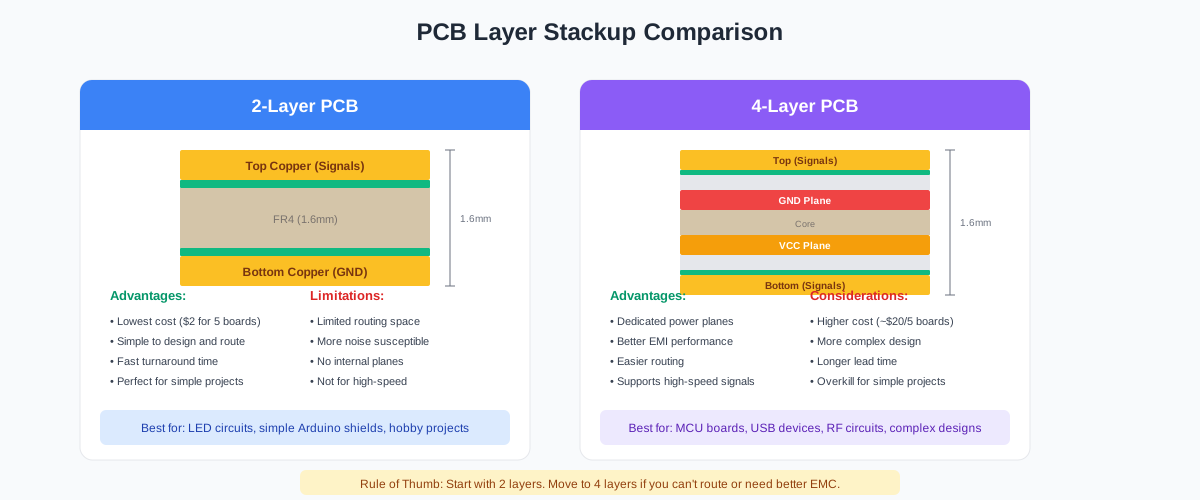
2-Layer vs 4-Layer: When to Use Each
Choose 2 Layers When:
- ✓ Simple circuits with few components
- ✓ Low-frequency designs (<10MHz signals)
- ✓ Budget is a primary concern
- ✓ Learning PCB design
- ✓ LED projects, simple sensors, basic Arduino shields
Cost: ~$2 for 5 boards at JLCPCB
Choose 4 Layers When:
- ✓ Can't route on 2 layers
- ✓ High-speed signals (USB 2.0+, SPI >20MHz, DDR memory)
- ✓ Need dedicated power and ground planes
- ✓ EMI/EMC compliance is required
- ✓ RF circuits or sensitive analog
Cost: ~$20-30 for 5 boards at JLCPCB
Rule of Thumb: Start with 2 layers. If you can't route everything or have signal integrity problems, move to 4 layers. Most hobby projects work fine on 2 layers.
Trace Routing Best Practices
Good routing separates working boards from problematic ones. Follow these guidelines to create reliable, manufacturable designs.
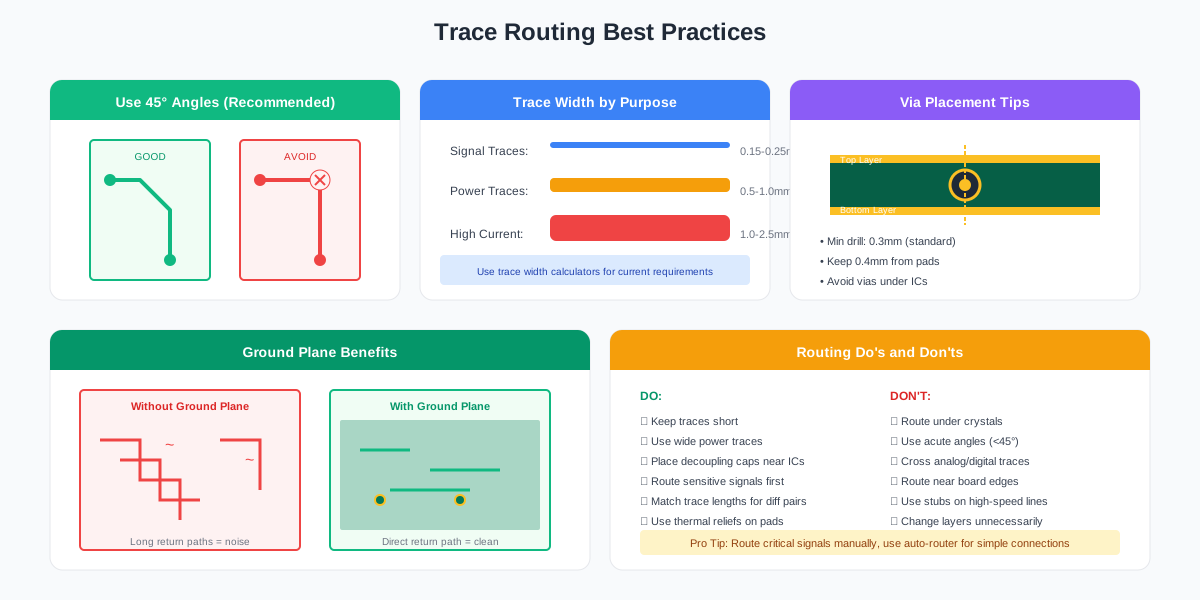
Trace Width Guidelines
Trace width determines how much current a trace can carry without overheating. The relationship follows IPC-2221 standards:
| Trace Type | Width | Max Current (approx) |
|---|---|---|
| Signal traces | 0.15-0.25mm | ~0.5A |
| Power traces (low) | 0.5mm | ~1A |
| Power traces (medium) | 1.0mm | ~2A |
| High current | 2.0mm+ | ~4A+ |
For precise calculations, use a PCB trace width calculator that accounts for copper weight, temperature rise, and whether traces are internal or external.
Routing Rules
Use 45° Angles
Route traces at 45° angles instead of 90°. Sharp corners can cause acid traps during manufacturing and signal reflections at high frequencies. Most EDA tools default to 45° routing.
Keep Traces Short
Shorter traces have lower resistance and inductance. Optimize placement to minimize trace lengths, especially for high-frequency signals and power.
Avoid Crossing Sensitive Signals
Don't route analog and digital signals in parallel or let them cross without a ground plane between them. Crosstalk can cause mysterious interference.
Use Thermal Reliefs
Pads connected to large copper planes should have thermal reliefs (spoke patterns) so they can be soldered without the plane acting as a heat sink.
Ground Planes: Why They Matter
A ground plane is a large copper pour connected to GND. Every serious PCB should have one. Benefits include:
- Lower noise: Signals have direct return paths
- Better EMI: The plane shields against radiation
- Lower impedance: Power delivery improves
- Heat spreading: The copper dissipates heat
For 2-layer boards, use the bottom layer primarily as ground plane. For 4-layer boards, layer 2 is typically a solid ground plane.
Common Beginner Mistakes
Learn from others' mistakes. Here are the most common errors that ruin PCB projects:
1. Wrong Footprints
The most common mistake. Always verify footprint dimensions against the actual component datasheet. Don't trust library defaults blindly. Test by printing 1:1 and placing components on paper.
2. No Ground Plane
Routing GND as individual traces causes noise, EMI problems, and unreliable operation. Always use a ground plane on at least one layer.
3. Thin Power Traces
Power traces carry significant current and must be sized appropriately. A trace too thin will heat up, add resistance, and potentially fail. Use 0.5mm minimum for power.
4. Missing Decoupling Capacitors
Every IC needs 100nF ceramic capacitors placed as close as possible to power pins. Missing them causes noise, instability, and random failures.
5. Ignoring DRC Errors
"It's probably fine" is never true. Clearance violations cause shorts. Unconnected nets mean missing connections. Fix every error before ordering.
6. Not Checking Silkscreen
Silkscreen text over pads gets removed during manufacturing. Component designators help during assembly and debugging—make sure they're readable and positioned correctly.
7. Components Too Close to Board Edge
Keep components at least 3mm from board edges. Manufacturers need this clearance for handling during production. Edge-mount connectors are exceptions.
Getting Your PCB Manufactured
Thanks to Chinese manufacturers, getting professional PCBs has never been cheaper or easier. You can have boards on your desk in 1-2 weeks for a few dollars.
Choosing a Fab House
| Manufacturer | Price (5 pcs) | Lead Time | Best For |
|---|---|---|---|
| JLCPCB | $2 + shipping | 7-14 days | Best value, EasyEDA integration |
| PCBWay | $5 + shipping | 7-14 days | Good quality, assembly services |
| OSH Park | $5/sq inch | 2-3 weeks | US-based, purple boards |
| Seeed Fusion | $5 + shipping | 7-14 days | PCBA, flex PCBs |
Manufacturing Specifications
When ordering, you'll need to specify these parameters:
Recommended Specs for Beginners
- Layers
- 2 (start here)
- Thickness
- 1.6mm (standard)
- Copper Weight
- 1oz (35μm)
- Solder Mask
- Green (cheapest)
- Surface Finish
- HASL Lead-Free (hand soldering)
- Silkscreen
- White
- Quantity
- 5 (minimum at most fabs)
Pro Tip: Most manufacturers preview your Gerber files before production. Always review this preview carefully—it shows exactly what you'll receive.
Frequently Asked Questions
How long does PCB design take for beginners?
A simple board (LED circuit, breakout board) takes 1-4 hours once you understand the workflow. Complex boards with MCUs can take a day or more. Your first board will take longer as you learn—expect 4-8 hours including tutorial time.
Can I design PCBs on a Mac/Linux/Chromebook?
Yes! EasyEDA runs in any modern browser, so it works on any platform. KiCad has native Mac and Linux builds. Altium requires Windows.
What's the minimum order quantity?
Most Chinese manufacturers (JLCPCB, PCBWay) have a minimum of 5 boards for $2-5. OSH Park has no minimum—you pay per square inch. For prototyping, 5 boards is actually great: you'll likely make mistakes and want spares for testing.
Should I use through-hole or SMD components?
SMD (Surface Mount) is the modern standard—smaller, cheaper, and more components are available. 0805 size (2mm x 1.2mm) is easy to hand-solder with a fine tip iron. Use through-hole for connectors and components that need mechanical strength.
How do I know if my design will work?
First, prototype on a breadboard if possible. Then: verify schematic is correct, run ERC and DRC with zero errors, double-check all footprints against datasheets, and have someone else review your design. For critical projects, print the board 1:1 on paper and place actual components on it.
What if I make a mistake?
Everyone makes mistakes—that's why prototype boards are cheap. Minor errors can often be fixed with bodge wires. Wrong footprints or missing connections require a new revision. The cost of fixing in software ($0) vs. fixing in hardware ($20+ and time) is why review is so important.
Next Steps
You now have a solid foundation in PCB design. Here's how to continue your learning:
- Design your first board – Start with something simple like an LED flasher or breakout board
- Follow our EasyEDA tutorial – Complete EasyEDA Tutorial 2025 walks through a real project step-by-step
- Order your boards – Nothing beats the feeling of holding your own PCB
- Learn from mistakes – Your first board probably won't be perfect, and that's okay
- Iterate and improve – Each design teaches you something new
Analyze Your Schematics with AI
Schemalyzer uses AI to review your EasyEDA schematics, finding errors and suggesting improvements before you order PCBs. Catch mistakes that DRC misses.
Recommended Resources
- Complete EasyEDA Tutorial (2025)
- PCB Trace Width Calculator
- Phil's Lab YouTube (excellent tutorials)
- All About Circuits (theory and tutorials)
Happy designing! The PCB design community is welcoming and helpful—don't hesitate to ask questions on forums or share your work for feedback.