TL;DR
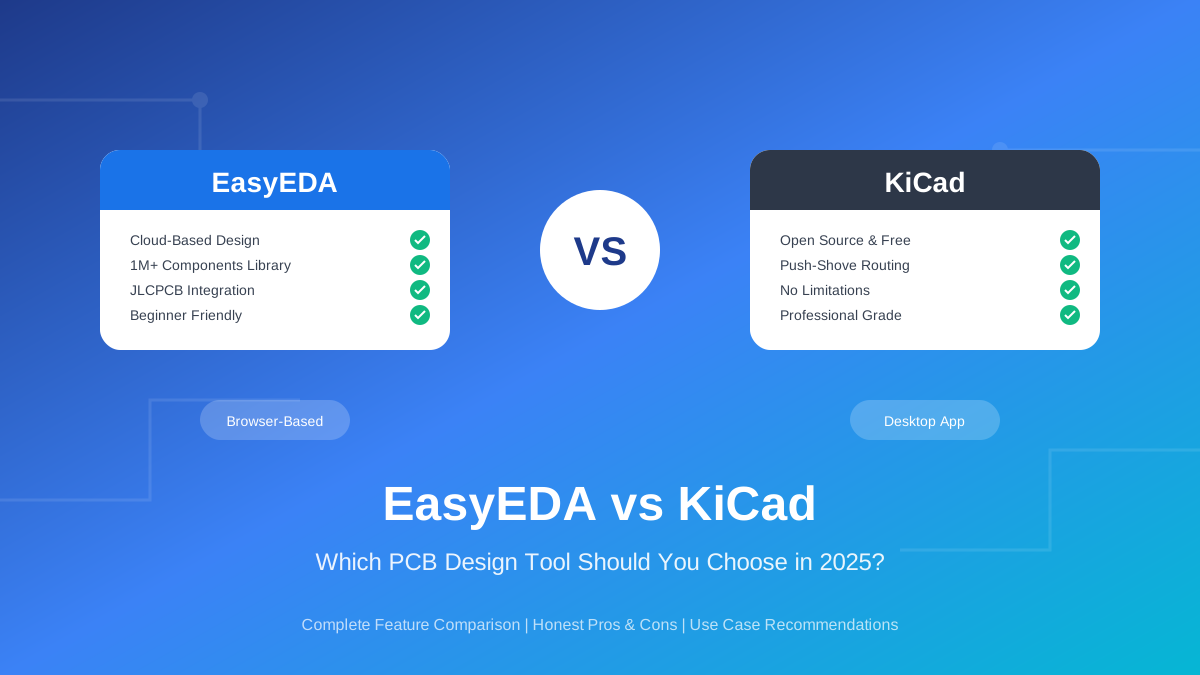
EasyEDA is best for beginners, rapid prototyping, and anyone who wants seamless JLCPCB integration. It's browser-based, has a massive component library, and takes hours to learn. KiCad is best for professionals, complex projects, and users who value open source and advanced features like push-shove routing. It takes longer to learn but offers more power and no vendor lock-in. Both are free—your choice depends on your priorities.
Introduction
Choosing the right PCB design software is one of the first decisions you'll make in electronics. The tool you pick will affect your learning curve, workflow efficiency, and even the complexity of projects you can tackle.
EasyEDA and KiCad are two of the most popular free PCB design tools available today. While both can produce professional results, they take fundamentally different approaches: EasyEDA prioritizes ease of use and cloud integration, while KiCad emphasizes power and openness.
This comparison will help you understand the real differences between these tools—not just feature lists, but practical implications for your projects and workflow.
Quick Verdict
Choose EasyEDA if you...
- →Are new to PCB design
- →Want to order from JLCPCB quickly
- →Need cloud collaboration
- →Design simple to moderate complexity boards
- →Want to start designing in minutes
Choose KiCad if you...
- →Need push-shove routing or differential pairs
- →Value open source and data ownership
- →Work offline frequently
- →Design high-speed or complex multi-layer boards
- →Want maximum flexibility and no vendor lock-in
Tool Overview
EasyEDA at a Glance
EasyEDA is a cloud-based electronic design automation tool developed by JLCPCB, one of the world's largest PCB manufacturers. It launched in 2014 with the goal of making PCB design accessible to hobbyists and students.
Key characteristics:
- Browser-first design — Works entirely in your web browser (desktop app also available)
- Integrated ecosystem — Tightly coupled with JLCPCB manufacturing and LCSC components
- Two editions — Standard (simpler) and Pro (more features)
- Cloud storage — Projects stored online with collaboration features
KiCad at a Glance
KiCad is an open-source electronics design automation suite that started in 1992. It's now backed by CERN and has become the go-to free alternative to expensive commercial tools like Altium.
Key characteristics:
- Desktop application — Runs locally on Windows, Mac, and Linux
- Open source — GPL licensed, fully transparent, community-driven
- Professional features — Push-shove routing, differential pairs, no artificial limits
- Local storage — Files stored on your computer, Git-friendly
Industry Trend: KiCad adoption has grown 400% since 2022. Major companies including Arduino, SparkFun, and even Tesla use KiCad for some projects. However, EasyEDA remains extremely popular for hobby projects due to its lower barrier to entry.
Feature Comparison
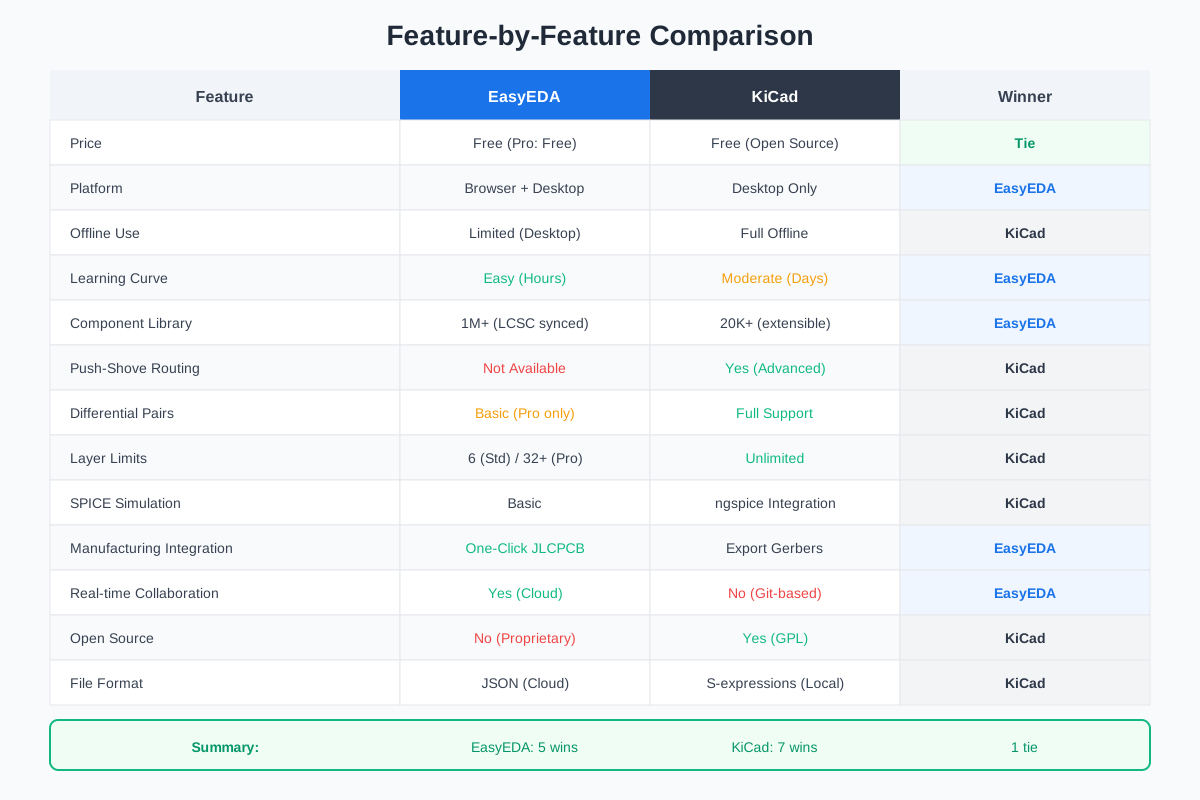
Let's compare the tools across the features that matter most for PCB design:
Pricing & Licensing
Both tools are free, but with different models:
| Aspect | EasyEDA | KiCad |
|---|---|---|
| Cost | Free (Standard & Pro) | Free forever |
| License | Proprietary | GPL (Open Source) |
| Revenue Model | PCB orders (JLCPCB) | Donations, grants |
| Data Ownership | Cloud-stored | Local files |
Winner: KiCad for openness and data ownership. EasyEDA for convenience (same free price with easier onboarding).
Platform & Installation
EasyEDA: Works in any modern browser—Chrome, Firefox, Safari, Edge. No installation required. Also offers desktop apps for Windows, Mac, and Linux. The browser version requires internet; the desktop version works partially offline.
KiCad: Desktop-only application (~1GB download). Runs on Windows, Mac, and Linux. Full offline functionality. All files stored locally.
Winner: EasyEDA for accessibility (instant access on any device). KiCad for offline work and data control.
User Interface & Learning Curve
EasyEDA: Modern, clean interface designed for beginners. Most users become productive within hours. Intuitive placement of tools and guided workflows. User experience rating of 9.2/10 on comparison sites.
KiCad: Powerful but initially overwhelming. Expect days to become comfortable. The interface has improved dramatically since version 6, but still requires learning time. User experience rating of 8.2/10.
Real Talk: "Any competent PCB CAD package has a steep learning curve. They are complex software." — KiCad forum user. This is true for both tools, but EasyEDA's cloud-based approach removes installation friction and library management headaches.
Component Libraries
EasyEDA: Over 1 million components synced directly from LCSC inventory. Real-time stock levels, pricing, and JLCPCB assembly compatibility visible during design. Community-contributed parts expand the library further.
KiCad: Ships with ~20,000 components. Can be extended with third-party libraries from SnapEDA, Ultra Librarian, and others. Components need manual sourcing—you design first, then find parts that match your footprints.
Winner: EasyEDA by a significant margin for library size and procurement integration. KiCad requires more manual library management.
Routing Capabilities
This is where KiCad pulls ahead significantly:
| Feature | EasyEDA | KiCad |
|---|---|---|
| Push-Shove Routing | No | Yes (excellent) |
| Differential Pairs | Basic (Pro only) | Full support |
| Length Tuning | Limited | Advanced |
| Auto-Router | Built-in (basic) | External (FreeRouting) |
| Layer Limits | 6 (Std) / 32+ (Pro) | Unlimited |
Winner: KiCad decisively. Push-shove routing alone is worth learning KiCad for complex designs. It automatically moves existing traces out of the way as you route—a massive time saver.
Simulation
EasyEDA: Built-in SPICE simulation with basic functionality. Good for simple circuits but limited compared to dedicated simulation tools.
KiCad: Integrated ngspice simulator with more advanced capabilities. Version 8 improved simulation workflows significantly.
Winner: KiCad for simulation depth. Neither tool replaces dedicated simulators like LTspice for serious analysis.
Manufacturing Integration
EasyEDA: One-click ordering to JLCPCB. Direct BOM export with LCSC part numbers. Real-time stock and pricing in the design environment. Seamless assembly setup for JLCPCB SMT service.
KiCad: Standard Gerber/drill file export works with any manufacturer. No built-in procurement integration—you export files and upload to your preferred fab house. Works with JLCPCB, PCBWay, OSH Park, or any other manufacturer.
Winner: EasyEDA for JLCPCB users. KiCad for manufacturer flexibility and no vendor lock-in.
Pros and Cons
EasyEDA Pros & Cons
Pros
- ✓ Zero setup—works in browser instantly
- ✓ Gentle learning curve
- ✓ 1M+ components with real-time LCSC data
- ✓ One-click JLCPCB ordering
- ✓ Real-time team collaboration
- ✓ Automatic cloud backups
- ✓ Works on Chromebooks and tablets
Cons
- ✗ No push-shove routing
- ✗ Limited differential pair support
- ✗ Internet required for most features
- ✗ Proprietary format (vendor lock-in)
- ✗ Performance issues on large designs
- ✗ Some users report server reliability issues
- ✗ Tied to JLCPCB/LCSC ecosystem
KiCad Pros & Cons
Pros
- ✓ Excellent push-shove routing
- ✓ Full differential pair support
- ✓ No artificial limits (layers, pins, size)
- ✓ 100% offline capable
- ✓ Open source—your data, your control
- ✓ Works with any manufacturer
- ✓ Active community and development
- ✓ Growing industry adoption
Cons
- ✗ Steeper learning curve
- ✗ Smaller built-in component library
- ✗ No built-in auto-router
- ✗ No native cloud collaboration
- ✗ Manual library management required
- ✗ Documentation gaps in some areas
- ✗ Large download size (~1GB)
Who Should Use Which Tool?
Absolute Beginners
Recommendation: EasyEDA
The zero-setup browser experience lets you focus on learning PCB concepts rather than fighting software installation. You can go from idea to ordered boards in an afternoon.
Students & Career Builders
Recommendation: KiCad
Job postings mentioning KiCad have increased 400% since 2022. Learning KiCad is an investment in your career. Skills transfer well to commercial tools like Altium.
Rapid Prototypers / Makers
Recommendation: EasyEDA
The JLCPCB integration and component library make EasyEDA unbeatable for quick iteration. Design → Order → Receive in under 2 weeks.
High-Speed / Complex Designs
Recommendation: KiCad
USB 2.0/3.0, DDR memory, RF circuits—anything requiring differential pairs, impedance control, or length matching needs KiCad's advanced routing features.
Open Source Advocates
Recommendation: KiCad
If you care about data ownership, vendor independence, and supporting open source—KiCad is the only choice. Your designs are yours, stored locally, in an open format.
Switching Between Tools
You don't have to commit to one tool forever. Both tools support importing from the other:
EasyEDA → KiCad
- KiCad 8 can import EasyEDA projects directly (File → Import Project)
- Schematics, PCB layouts, and symbols transfer
- Some manual cleanup usually required
KiCad → EasyEDA
- EasyEDA can import Altium format (export KiCad → Altium first)
- Direct import of KiCad files is limited
- Component libraries don't transfer automatically
Pro Tip: Many engineers use both tools. EasyEDA for quick prototypes and simple projects, KiCad for complex production designs. There's no rule saying you can only use one.
Frequently Asked Questions
Is EasyEDA really free?
Yes, both EasyEDA Standard and Pro are completely free. JLCPCB provides EasyEDA to streamline PCB orders—they make money when you manufacture boards, not from software licenses.
Can I use EasyEDA without JLCPCB?
Absolutely. You can export Gerber files from EasyEDA and order from any manufacturer—PCBWay, OSH Park, or your local fab house. The JLCPCB integration is convenient but not required.
How long does it take to learn KiCad?
Most users become comfortable within a week of focused learning. Expect 3-5 days to design your first board, then ongoing learning as you tackle more complex features. YouTube tutorials from Phil's Lab and Digikey are excellent resources.
Which has better component libraries?
EasyEDA wins on quantity (1M+ vs 20K+) and procurement integration. KiCad libraries are well-curated but smaller. Both can be extended with third-party libraries from SnapEDA and Ultra Librarian.
What about Altium? Should I consider that instead?
Altium Designer is ~$7,000/year—overkill for hobbyists and most small businesses. Consider Altium if your employer pays for it or you're doing professional high-speed design. For everyone else, KiCad provides 90% of Altium's capability for free.
Can I collaborate on KiCad projects?
Yes, but differently than EasyEDA. KiCad files are Git-friendly text files. Teams use GitHub/GitLab for version control and collaboration. It's not real-time like EasyEDA, but it's robust for professional workflows.
Conclusion
Both EasyEDA and KiCad are excellent tools—the "best" choice depends entirely on your priorities:
- Choose EasyEDA if you want the fastest path from idea to manufactured boards, especially through JLCPCB. It's perfect for beginners, rapid prototyping, and simple to moderate complexity designs.
- Choose KiCad if you need professional routing features, value open source, work offline, or build complex high-speed designs. The learning investment pays off with more capability and career relevance.
The good news? Both are free, so you can try both and see which fits your workflow. Many engineers use EasyEDA for quick projects and KiCad for serious designs—there's no rule saying you have to pick just one.
Analyze Your EasyEDA Designs
Whichever tool you choose, Schemalyzer can help review your EasyEDA schematics for errors and improvements before you order boards.