Key Takeaways
- ✓IPC-2221 defines minimum clearances: 0.1mm for internal layers, 0.6mm external uncoated (31-100V)
- ✓Follow the 3W rule for signal spacing: clearance = 3× trace width for crosstalk prevention
- ✓Minimum annular ring: 0.15mm (6 mils) for standard vias, 0.05mm (2 mils) for IPC Class 3
- ✓Run DRC checks throughout design - 30%+ of Gerber files contain errors
- ✓Place decoupling capacitors within 3-5mm of IC power pins with short, direct traces
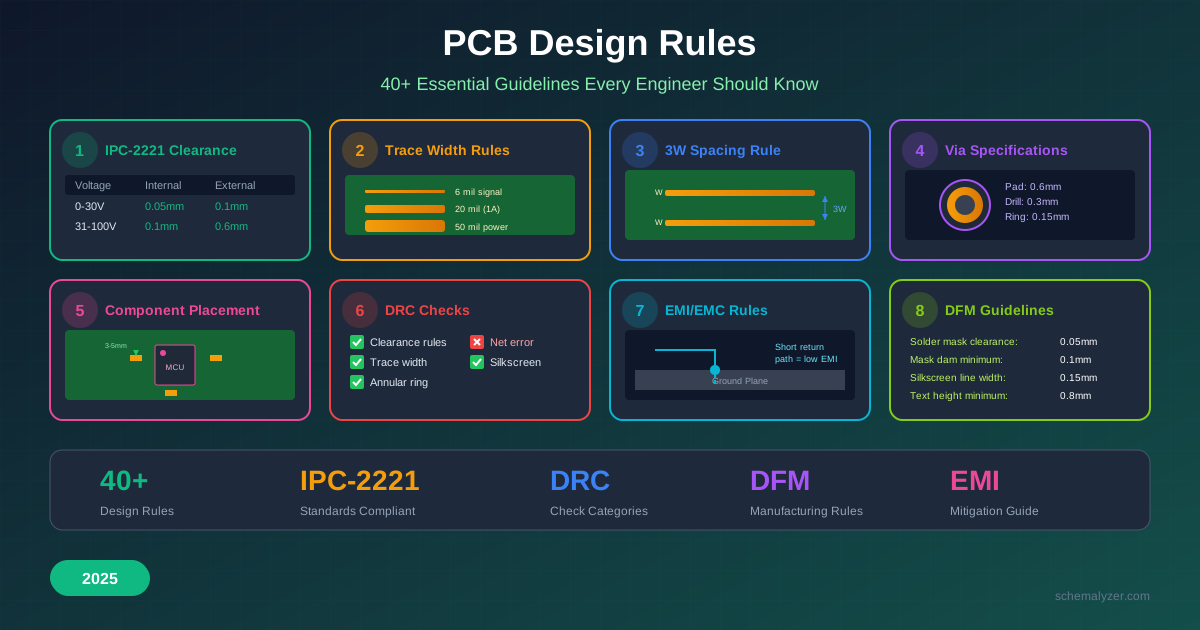
Table of Contents
PCB design rules are the foundation of every successful board. They determine whether your design will manufacture correctly, function reliably, and meet industry standards. In this comprehensive guide, we'll cover the 40+ essential rules every engineer should know - from IPC-2221 clearance tables to practical DRC settings.
1. Why Design Rules Matter
According to NCAB Group, more than 30% of Gerber data packs submitted to manufacturers contain issues - including design rule conflicts, ambiguous information, and specification contradictions. These errors lead to:
- Delayed production - Back-and-forth with fabricators to clarify issues
- Failed boards - Manufacturing defects from violated constraints
- Signal integrity problems - Crosstalk, reflections, and EMI failures
- Reliability issues - Early field failures from inadequate clearances
- Increased costs - Respins, rework, and expedited shipping
Pro Tip
Always consult your PCB fabricator for their specific capabilities before finalizing design rules. Standard manufacturers like JLCPCB have documented specifications, but capabilities vary. Use their rules as minimums, not targets.
2. IPC-2221 Clearance Standards
IPC-2221 is the internationally recognized standard for PCB design, published by IPC (Association Connecting Electronics Industries). It defines minimum conductor spacing based on voltage, layer type, and environmental conditions.
2.1 Bare Board Minimum Clearances (Table 6-1)
| Voltage (V) | Internal Layers | External Uncoated | Conformal Coated |
|---|---|---|---|
| 0-15V | 0.05mm (2 mil) | 0.1mm (4 mil) | 0.05mm (2 mil) |
| 16-30V | 0.05mm (2 mil) | 0.1mm (4 mil) | 0.05mm (2 mil) |
| 31-50V | 0.1mm (4 mil) | 0.6mm (24 mil) | 0.13mm (5 mil) |
| 51-100V | 0.1mm (4 mil) | 0.6mm (24 mil) | 0.13mm (5 mil) |
| 101-150V | 0.2mm (8 mil) | 0.6mm (24 mil) | 0.4mm (16 mil) |
| 151-250V | 0.2mm (8 mil) | 1.25mm (50 mil) | 0.4mm (16 mil) |
| 251-300V | 0.2mm (8 mil) | 1.25mm (50 mil) | 0.4mm (16 mil) |
| 301-500V | 0.25mm (10 mil) | 2.5mm (100 mil) | 0.8mm (32 mil) |
2.2 Clearance vs. Creepage
Understanding the difference is critical for safety compliance:
Clearance
The shortest distance between two conductors measured through air. Critical for preventing arc flashover during voltage spikes.
Creepage
The shortest distance between conductors measured along the PCB surface. Critical for preventing tracking due to contamination.
Important Note
For high-voltage designs (>500V), use the formula: Clearance = 2.5mm + (V-500) × 0.005mm for external uncoated conductors. Safety standards like IEC 62368-1 may require stricter values.
3. Trace Width and Spacing Rules
3.1 Minimum Trace Width by Application
| Application | Min Width | Notes |
|---|---|---|
| Standard signal traces | 0.15mm (6 mil) | Safe for most manufacturers |
| Fine-pitch BGA breakout | 0.1mm (4 mil) | Requires advanced fabrication |
| Power traces (1A @ 10°C rise) | 0.5mm (20 mil) | 1oz copper, external layer |
| Power traces (3A @ 10°C rise) | 1.5mm (60 mil) | 1oz copper, external layer |
| Main power rails (5-10A) | 2.5mm (100 mil)+ | Or use copper pour/plane |
3.2 The 3W Rule for Signal Spacing
For digital signals, the 3W rule prevents crosstalk between parallel traces:
Trace Spacing = 3 × Trace Width
Example: 20 mil traces → 60 mil center-to-center spacing
For critical signals, use the 5W rule or 10W for sensitive analog signals to achieve better isolation.

3.3 Routing Direction Rules
2-Layer Boards
- • Top layer: Horizontal routing
- • Bottom layer: Vertical routing
- • Minimizes crossing and vias
- • Use large ground pour on bottom
4+ Layer Boards
- • Alternate H/V on signal layers
- • Dedicated ground plane (L2)
- • Dedicated power plane (L3)
- • Reference planes reduce EMI
4. Via and Annular Ring Requirements
4.1 Via Size Specifications
| Via Type | Drill Diameter | Pad Diameter | Annular Ring |
|---|---|---|---|
| Standard (2-layer) | 0.3mm (12 mil) | 0.6mm (24 mil) | 0.15mm (6 mil) |
| Standard (4+ layer) | 0.2mm (8 mil) | 0.45mm (18 mil) | 0.125mm (5 mil) |
| Micro via (HDI) | 0.1mm (4 mil) | 0.25mm (10 mil) | 0.075mm (3 mil) |
| IPC Class 3 | Per design | Per design | 0.05mm (2 mil) min |
4.2 Annular Ring Calculation
Annular Ring = (Pad Diameter - Drill Diameter) ÷ 2
Example: 0.6mm pad with 0.3mm drill = 0.15mm annular ring
Good Via
Drill centered, uniform ring
Tangency
Drill edge touches pad edge
Breakout
Drill extends beyond pad
Manufacturing Tolerance
PCB manufacturers typically have ±0.075mm (3 mil) drill registration tolerance. Design with larger annular rings (0.15mm+) to account for this variation and ensure reliable connections.
4.3 Via Current Capacity
Use multiple vias for high-current connections. A single 0.3mm via with 1oz copper can safely carry approximately 1A. For power connections:
- 3A power trace: Use 3-4 vias in parallel
- 5A+ power connection: Use via array or larger vias (0.5mm+)
- Thermal vias under ICs: Use 0.3mm vias on 1mm grid for heat dissipation
5. Component Placement Rules
5.1 Placement Priority Order
- Fixed/mechanical components - Connectors, mounting holes, switches
- Large ICs and processors - Position centrally to facilitate routing
- Power components - Regulators, inductors near input power
- Decoupling capacitors - Within 3-5mm of IC power pins
- Crystal oscillators - As close as possible to MCU clock pins
- Remaining passives - Group by function, orient consistently
5.2 Component Spacing Rules
| Component Type | Min Spacing | Recommended |
|---|---|---|
| SMD to SMD | 0.2mm (8 mil) | 0.3mm+ (12 mil+) |
| SMD to edge | 0.3mm (12 mil) | 0.5mm+ (20 mil+) |
| THT to THT | 0.5mm (20 mil) | 1mm+ (40 mil+) |
| Heat-generating components | 2mm (80 mil) | 5mm+ (200 mil+) |
5.3 Component Orientation Rules
Do
- ✓ Orient all ICs in same direction
- ✓ Align polarized caps consistently
- ✓ Group related components together
- ✓ Place all SMD on same side (if possible)
- ✓ Mark Pin 1 / polarity clearly
Don't
- ✗ Place SMD behind through-hole pads
- ✗ Put tall components near board edges
- ✗ Block thermal paths with components
- ✗ Place test points under ICs
- ✗ Ignore assembly panel orientation
6. Power and Ground Design Rules
6.1 Power Distribution Rules
- Use dedicated power planes when possible (4+ layer boards)
- Never daisy-chain power - Use star or distributed topology
- Main power rails: Minimum 100 mils (2.5mm) trace width for 5-10A
- Power vias: Multiple vias for plane connections, especially near loads
- Bulk capacitors: Place at power entry point (10-100µF)
6.2 Ground Plane Rules
Ground Plane Design Checklist
- ☐ Continuous ground plane (minimize splits)
- ☐ Ground vias near every IC ground pin
- ☐ Via stitching around board perimeter
- ☐ No signal traces crossing ground splits
- ☐ Short return paths for all signals
- ☐ Separate analog/digital grounds (if needed)
- ☐ Single-point ground connection for A/D
- ☐ Ground fill on unused areas
6.3 Decoupling Capacitor Rules
| IC Type | Capacitor Value | Distance to Pin | Ground Via |
|---|---|---|---|
| Low-speed logic | 100nF | <5mm | Adjacent to cap |
| MCU / FPGA | 100nF + 10nF | <3mm | Via per cap |
| High-speed digital | 100nF + 10nF + 1nF | <2mm | Shared via array |
| RF / Precision analog | Per datasheet | <1mm | Direct to plane |
7. Signal Integrity Rules
7.1 When to Consider Transmission Lines
Any PCB trace longer than λ/10 (one-tenth of the signal wavelength) should be treated as a transmission line:
Critical Length = Rise Time × 0.15 × c
Where c ≈ 150mm/ns on FR4 (speed factor ~0.5)
| Rise Time | Critical Length | Example |
|---|---|---|
| 5ns | 75mm | Standard logic |
| 1ns | 15mm | Fast CMOS |
| 0.2ns | 3mm | DDR3/4, USB 3.0 |
7.2 Impedance Control Rules
| Interface | Impedance | Type | Tolerance |
|---|---|---|---|
| USB 2.0 | 90Ω differential | Differential pair | ±10% |
| USB 3.0/3.1 | 90Ω differential | Differential pair | ±10% |
| HDMI | 100Ω differential | Differential pair | ±10% |
| Ethernet (RGMII) | 100Ω differential | Differential pair | ±10% |
| DDR3/DDR4 | 40-60Ω single-ended | Single-ended | ±10% |
| PCIe | 85Ω differential | Differential pair | ±15% |
7.3 Length Matching Rules
- Differential pairs: Match within 5 mils (0.127mm) of each other
- DDR data bus: Match within ±25 mils of each other, match to clock within ±50 mils
- DDR address/command: Match within ±25 mils of clock
- Use serpentine routing: Match lengths with 3× trace width minimum serpentine gap
8. EMI/EMC Design Rules
8.1 EMI Reduction Rules
Loop Area Reduction
- • Keep signal and return paths close
- • Use ground planes as return paths
- • Minimize via transitions
- • Route clock signals first, shortest
Shield and Filter
- • Ground fill on outer layers
- • Via stitching around board edge
- • Ferrite beads on noisy power lines
- • LC filters at I/O connectors
8.2 Critical EMI Rules
- Never route signals over split planes - Creates impedance discontinuities and radiates EMI
- Avoid 90° trace corners - Use 45° angles or curved traces (reduces reflections and EMI)
- Keep clock traces short - Clock signals are the #1 EMI source
- Add ground guard traces - Around sensitive analog signals and between digital/analog
- Use continuous ground planes - Every break is a potential EMI antenna
EMC Testing Tip
Reserve pads for optional EMI shields in your design. If EMC testing reveals issues, you can add metal shielding cans without respinning the board.
9. Design Rule Check (DRC) Essentials
DRC (Design Rule Check) automatically validates your layout against predefined constraints. Run DRC throughout the design process, not just at the end.
9.1 Critical DRC Categories
| Category | Rules Checked | Impact |
|---|---|---|
| Clearance | Trace-to-trace, trace-to-pad, pad-to-pad | Manufacturing/shorts |
| Width | Minimum trace width, neck-down | Manufacturing/opens |
| Annular Ring | Via/pad ring size, drill tolerance | Connection reliability |
| Connectivity | Unconnected nets, unrouted connections | Functionality |
| Plane | Plane-to-plane clearance, copper slivers | Signal integrity |
| Silkscreen | Overlap with pads, minimum text size | Assembly clarity |
9.2 Common DRC Errors to Fix
Clearance Violation
Two conductors too close together. Fix by increasing spacing or rerouting.
Unconnected Pin
Net requires connection but pin is floating. Route the connection or verify intentional NC.
Silk Over Pad
Silkscreen overlaps exposed copper. Move text or add solder mask clearance.
Net Crossing Gap
High-speed signal crosses plane split. Reroute or add stitching vias.
10. Design for Manufacturing (DFM) Rules
10.1 Solder Mask Rules
| Parameter | Minimum | Recommended |
|---|---|---|
| Mask clearance (expansion) | 0.05mm (2 mil) | 0.075mm (3 mil) |
| Mask dam between pads | 0.1mm (4 mil) | 0.15mm (6 mil) |
| Solder mask to board edge | 0.25mm (10 mil) | 0.5mm (20 mil) |
10.2 Silkscreen Rules
- Minimum line width: 0.15mm (6 mil) - thinner may not print clearly
- Minimum text height: 0.8mm (32 mil) - smaller is unreadable
- Clearance to pads: 0.15mm (6 mil) minimum
- Use bold fonts: Thin strokes disappear during printing
- Mark Pin 1 and polarity: Essential for assembly
10.3 Thermal Relief Rules
Apply thermal reliefs to through-hole pads connected to copper planes:
- Through-hole components: Always use thermal reliefs for wave soldering
- SMD to plane connections: Optional for reflow, recommended for hand soldering
- Spoke width: 0.2-0.3mm (8-12 mil) typical
- Gap width: 0.2-0.25mm (8-10 mil) typical
11. Complete Design Rules Checklist
Pre-Layout Checklist
- ☐ Define stackup with fabricator
- ☐ Set trace width/spacing rules
- ☐ Configure via sizes and types
- ☐ Define net classes (power, signal, high-speed)
- ☐ Set impedance requirements
- ☐ Configure clearance rules by voltage
- ☐ Define component spacing rules
- ☐ Set solder mask and silkscreen rules
- ☐ Enable DRC and run initial check
- ☐ Review mechanical constraints
Post-Layout Checklist
- ☐ Run final DRC - zero errors
- ☐ Verify all nets connected
- ☐ Check power/ground plane integrity
- ☐ Verify decoupling cap placement
- ☐ Validate differential pair routing
- ☐ Check length matching requirements
- ☐ Inspect solder mask openings
- ☐ Verify silkscreen clarity
- ☐ Add test points as needed
- ☐ Check fiducial placement
- ☐ Generate and verify Gerbers
- ☐ Review in Gerber viewer before ordering
12. Frequently Asked Questions
What is the minimum trace width for JLCPCB?
JLCPCB supports 5 mil (0.127mm) minimum trace width for 2-layer boards with 1oz copper, and 4 mil (0.1mm) for 4+ layer boards. However, 6 mil (0.15mm) is recommended for better yield and reliability.
How do I calculate trace width for current capacity?
Use the IPC-2152 formula or a trace width calculator. For external layers with 1oz copper and 10°C temperature rise: approximately 10 mils per amp for low currents, increasing non-linearly. For 3A, use ~40-50 mils; for 5A, use ~80-100 mils.
What's the difference between IPC Class 2 and Class 3?
Class 2 is for dedicated service electronics (computers, general commercial). Class 3 is for high-reliability electronics (medical, military, aerospace). Class 3 has stricter requirements for annular rings (2 mil minimum), conductor widths, and inspection criteria.
Should I use 45° or 90° trace corners?
Always use 45° (chamfered) or curved corners. While 90° corners don't cause significant signal integrity issues at most frequencies, they are considered bad practice, can cause acid traps during etching, and increase EMI slightly.
How close should decoupling capacitors be to ICs?
As close as physically possible - ideally within 2-3mm of the power pin. The trace inductance between the capacitor and pin should be minimized. Place the capacitor with the ground pin closest to a ground via.
What is via stitching and when should I use it?
Via stitching connects ground planes on different layers using arrays of vias. Use it around board edges (every 1/20th of wavelength at highest frequency), around sensitive circuits, and between split ground regions to reduce EMI and improve ground return paths.
How do I handle mixed analog/digital ground?
For simple designs, use a single solid ground plane and keep analog/digital circuits physically separated. For sensitive analog, use separate ground regions connected at a single point near the power entry. Never route digital signals over analog ground or vice versa.
When should I use 4 layers instead of 2?
Consider 4 layers when: your design has high-speed signals (>25MHz), you need controlled impedance, EMI is a concern, routing is congested, or you need dedicated power/ground planes. The cost difference is minimal (~$5-10 more for prototype quantities).
Conclusion
Mastering PCB design rules is essential for creating reliable, manufacturable boards. The rules in this guide - from IPC-2221 clearance standards to DFM best practices - represent decades of industry experience. Apply them consistently, run DRC checks throughout your design process, and always verify with your fabricator's specific capabilities.
Remember: good design rules prevent costly mistakes. The time spent setting up proper constraints upfront saves exponentially more time in debugging, rework, and manufacturing issues later.
Related Articles
PCB Layout Best Practices: 25 Essential Rules
Practical layout guidelines for professional designs
JLCPCB Design Rules and Capabilities
Complete guide to JLCPCB manufacturing specifications
PCB Trace Width Guide with Calculator
IPC-2221 calculations and current capacity tables
PCB Ground Plane Design Guide
Signal integrity and EMI reduction strategies