
Introduction
Every experienced engineer has a story about a schematic error that cost them a board respin - or worse, made it to production. According to industry data, there are over 100 different errors a designer can make in the schematic phase alone, and 21% of critical design errors are related to missing power sources.
The good news? Most schematic errors follow predictable patterns. Learn to recognize these 25 common mistakes, and you will catch them before they become expensive problems. This guide covers the errors that cause the most PCB failures, organized by category, with specific examples and solutions for each.
We will cover power supply errors, connection mistakes, component problems, microcontroller-specific issues, and protection circuit failures. For each error, you will learn what it looks like, why it happens, and how to prevent it.
Part 1: Power Supply Errors (1-6)
Power supply errors are the most common category of critical schematic mistakes. A circuit without proper power will not work - period. These errors often slip through because they are easy to overlook in complex schematics.
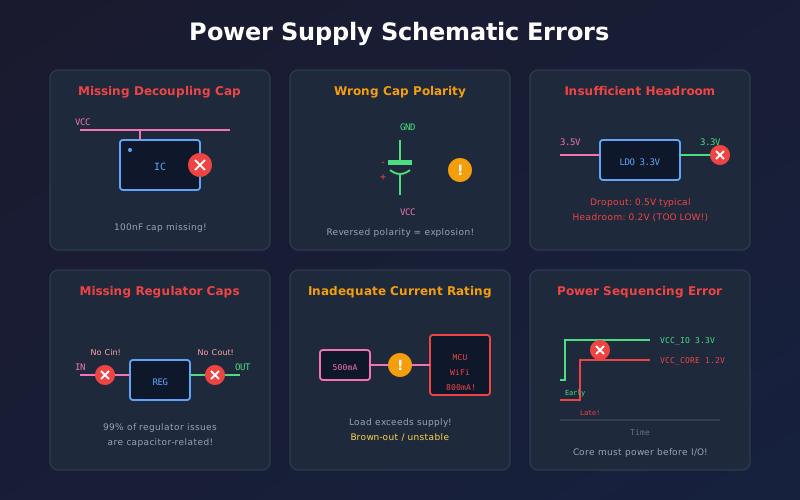
Error 1: Missing Power Source
The Problem
An IC or module has no power connection at all. This sounds obvious, but it is the single most common critical error (21% of all critical errors).
Why it happens:
- Power pins hidden on separate symbol pages
- Assuming power is implicit in the symbol
- Multi-part symbols where power is on a different unit
- Copy-paste errors where power nets are not updated
How to find it:
- Run ERC - look for "unconnected power pin" warnings
- Check every IC against its datasheet - count power pins
- Verify VCC and GND connections for each component
Prevention:
Create a power audit spreadsheet listing every IC and its required power rails. Check off each connection as you verify it.
Error 2: Wrong Decoupling Capacitor Values or Placement
The Problem
Decoupling capacitors are missing, have wrong values, or are placed too far from ICs. This causes voltage droops, noise, and erratic behavior.
Common mistakes:
- Using 10uF instead of 100nF (wrong frequency response)
- One capacitor shared between multiple ICs
- Capacitor on schematic but placed 10mm away on PCB
- Missing bulk capacitor for transient current demands
The fix:
- 100nF ceramic: One per power pin, within 3mm
- 10uF ceramic: One per IC, nearby
- 100uF bulk: One per board section
For STM32/ESP32: Rule is n x 100nF + 1 x 4.7uF where n = number of VDD pins.
Error 3: Reversed Capacitor Polarity
The Problem
Electrolytic or tantalum capacitors connected backwards. This can cause capacitor failure, leakage, overheating, or even explosion.
Why it happens:
- Schematic symbol polarity not clear
- Different footprint conventions (+ vs - marking)
- Confusion between input and output filtering
Prevention:
- Use ceramic capacitors where possible (non-polarized)
- For tantalums: voltage rating must be 20% higher than expected voltage
- Mark polarity clearly on schematic with + symbol
- Double-check during layout - footprint stripe orientation
Error 4: Insufficient Voltage Headroom
The Problem
Linear regulator input voltage is too close to output voltage, causing dropout and unregulated output.
Example:
Using a 7805 (5V regulator with 2V dropout) with 6V input. The output will be around 4V - not 5V - because the regulator needs at least 7V input.
The rule:
- Standard regulators (78xx): Input >= Output + 2V
- LDO regulators: Input >= Output + Dropout (check datasheet)
- Account for input voltage ripple and variation
Error 5: Missing Input/Output Capacitors on Regulators
The Problem
Voltage regulators require specific input and output capacitors for stability. Missing or wrong values cause oscillation or poor regulation.
99% of regulator problems are capacitor-related - wrong type, wrong value, or wrong placement.
Common mistakes:
- Using ceramic-only where datasheet specifies electrolytic (ESR matters)
- Input capacitor too small for input impedance
- Output capacitor value outside stable range
Prevention:
Always follow the datasheet recommended values exactly. For LDOs especially, the output capacitor ESR affects stability - the datasheet specifies acceptable ranges.
Error 6: Wrong Regulator Pinout
The Problem
Different regulators in the same package have different pinouts. Using the wrong library symbol results in input/output swapped.
Classic example:
The 78xx positive regulator and 79xx negative regulator look identical but have completely different pinouts. The 7915 will fry instantly if you use a 7815 footprint.
Prevention:
- Always verify pinout against the actual datasheet
- Never trust generic library symbols
- Check part number on your BOM matches schematic symbol
Part 2: Connection Errors (7-12)
Connection errors create circuits that look correct but do not work. These are especially frustrating because they often pass visual inspection.
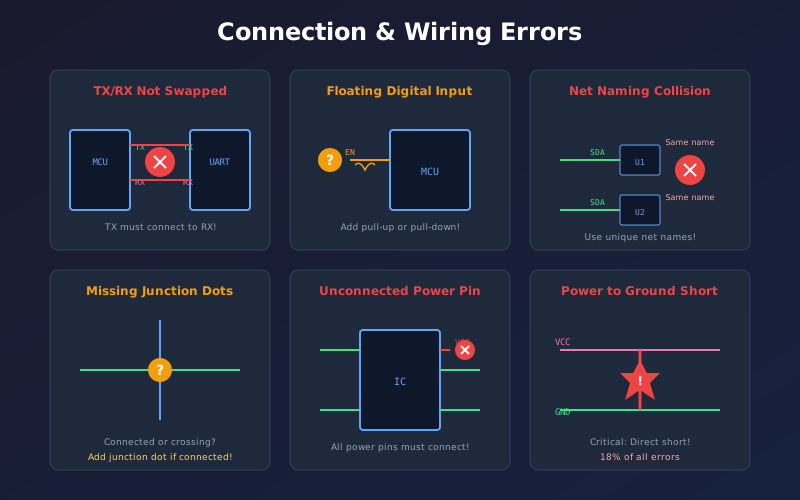
Error 7: Swapped Data Lines (TX/RX, MISO/MOSI, SDA/SCL)
The Problem
Communication signals are crossed. UART TX and RX need to swap between devices, but SPI MISO/MOSI should NOT swap (they are named from master perspective).
The confusion:
- UART: TX on device A connects to RX on device B (must cross)
- SPI: MOSI to MOSI, MISO to MISO (do NOT cross)
- I2C: SDA to SDA, SCL to SCL (do NOT cross)
- RS-485: A to A, B to B (but some datasheets swap A/B meaning)
Prevention:
Add 0-ohm resistors on data lines in first prototypes. If signals are swapped, you can cross them at the resistor positions without a board respin.
Error 8: Unconnected Nets
The Problem
Wires that look connected are not actually joined, or net labels do not match.
Common causes:
- Wire endpoints not on grid - look connected but are not
- Typos in net labels: "VCC" vs "Vcc" vs "VCC_3V3"
- 4-way junctions without junction dots
- Copy-paste where net names were not updated
Detection:
- ERC flags unconnected pins
- Netlist review shows orphan nets
- Click on each net label and verify all expected connections highlight
Error 9: Multiple Outputs on Same Net
The Problem
Two output pins connected together - one tries to drive high while the other drives low, causing contention and possible damage.
18% of critical errors involve multiple outputs on a net.
Examples:
- Two MCU GPIO pins both configured as outputs on same net
- Regulator output connected to another power source
- Two logic gates driving same signal
Exception: Open-drain/open-collector outputs can share a net (with pull-up).
Error 10: Missing Ground Connections
The Problem
Components with ground pins not connected, or different ground symbols that are not actually connected together.
Common causes:
- Using different ground symbols (GND, AGND, DGND) without connecting them
- Assuming ground is implicit through power connector
- Missing ground on multi-part symbols
Prevention:
Verify your ground symbols are all on the same net. In EasyEDA/KiCad, click on a GND symbol - all grounds should highlight if they are connected.
Error 11: Wrong Net Names
The Problem
Net labels with typos or inconsistent naming create unconnected signals.
Examples:
- "ENABLE" vs "EN" vs "ENABLE_N"
- "SPI_CLK" vs "SPI_SCLK" vs "SCK"
- Underscores vs hyphens: "I2C_SDA" vs "I2C-SDA"
Best practice:
Establish a net naming convention at project start. Use consistent prefixes (SPI_, I2C_, UART_) and suffixes (_N for active-low signals).
Error 12: Floating Inputs
The Problem
Input pins left unconnected float to undefined states, causing erratic behavior, excessive current draw, or damage.
Pins that must not float:
- CMOS logic inputs (draw through-current when floating)
- Enable/disable pins
- MCU configuration pins
- Comparator inputs
The fix:
Every input needs a defined state. Use pull-up or pull-down resistors (typically 10k). For unused MCU pins, configure them as outputs or enable internal pull-ups.
Part 3: Component Errors (13-17)
Component errors are among the most expensive mistakes because they often require board respins to fix.
Error 13: Wrong Footprint for Symbol
The Problem
The schematic symbol is correct, but the associated footprint does not match the physical component. This is the most common cause of board respins.
Even 0.5mm error in pad spacing makes the component impossible to solder.
Common causes:
- Using generic footprint (0805 vs 0603)
- Pin 1 orientation different between symbol and footprint
- Metric vs imperial confusion (mm vs mils)
- Pad dimensions from wrong section of datasheet
Prevention:
"Make double-check of your circuit, triple-check of new library parts." Always verify footprints against physical components or manufacturer datasheets.
Error 14: Incorrect Component Values
The Problem
Resistor, capacitor, or other component values are wrong for the application.
Common mistakes:
- Confusing uF, nF, pF (104 = 100nF, not 104uF)
- Copy-paste with wrong value
- Calculation errors in voltage dividers
- Wrong LED current-limiting resistor (too bright or too dim)
Example:
For a 3.3V MCU with 2V LED forward voltage and 10mA desired current:R = (3.3V - 2V) / 10mA = 130 ohm. Using 1k would give only 1.3mA (dim LED).
Error 15: Undersized Components
The Problem
Components rated for less voltage, current, or power than the circuit requires. Can cause overheating, failure, or fire.
Rules of thumb:
- Capacitor voltage: Rate for 25-50% higher than operating voltage
- Resistor power: Calculate P = I squared x R, use 2x safety margin
- MOSFET current: Check continuous drain current, not peak
- Inductor current: Saturation current must exceed peak current
Example failure:
A 0402 resistor dissipating 0.1W when rated for 0.0625W will overheat and fail.
Error 16: Obsolete or Unavailable Parts
The Problem
Designing with components that are end-of-life, out of stock, or have impossibly long lead times.
Check before designing:
- Component lifecycle status (active, NRND, obsolete)
- Current stock at major distributors
- Lead time for larger quantities
- Second-source alternatives
Error 17: Wrong Pin Assignments
The Problem
Library symbol pin numbers or names do not match the actual component.
Common with:
- Multi-gate ICs (different pin numbers per gate)
- FETs (varying G/D/S arrangements)
- Connectors (pin 1 location varies by manufacturer)
- User-created library parts
Prevention:
Print schematic and datasheet side-by-side. Verify every pin assignment manually for critical components.
Part 4: Microcontroller Errors (18-21)
Microcontroller circuits have specific requirements that are easy to get wrong. These errors often cause intermittent or hard-to-debug problems.
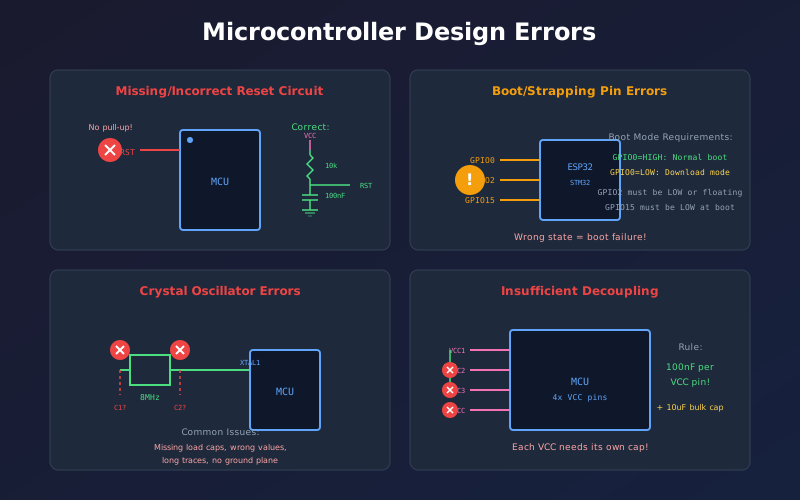
Error 18: Missing or Wrong Reset Circuit
The Problem
Reset pin floating, wrong pull-up value, or missing noise filtering causes random resets or failure to start.
Common mistakes:
- 100k pull-up too weak (noise can trigger reset)
- Missing filter capacitor on reset pin
- Reset line routed near noisy signals
- Pull-up too strong for programmer to override
Recommended circuit:
- 10k pull-up resistor to VCC
- 100nF capacitor from RESET to GND
- Optional: External reset IC for clean power-on reset
Error 19: Missing Decoupling Per Power Pin
The Problem
Using one decoupling capacitor for an MCU with multiple VDD pins. Each power pin needs its own local decoupling.
The rule:
One 100nF ceramic capacitor per VDD pin, placed within 3mm of the pin. Plus one 10uF bulk capacitor per chip.
Why it matters:
Different MCU sections (core, peripherals, ADC) draw current from different pins. Shared decoupling cannot provide local energy storage for each section.
Error 20: Crystal Circuit Errors
The Problem
Wrong load capacitor values, missing capacitors, or excessive trace length prevents oscillator startup.
Common mistakes:
- Load capacitor values not matched to crystal
- Using ceramic resonator values for crystal
- Long traces adding parasitic capacitance
- Missing ground pour under crystal
Load capacitor calculation:
CL_total = (C1 x C2) / (C1 + C2) + C_stray
Where CL_total should match crystal specified load capacitance, and C_stray is typically 2-5pF from PCB traces.
Error 21: Boot/Strapping Pin Mistakes
The Problem
Boot mode selection pins left floating or set to wrong state, causing MCU to enter wrong mode (bootloader instead of normal operation).
Examples:
- STM32: BOOT0 must be LOW for normal boot from flash
- ESP32: GPIO0 must be HIGH at boot for normal operation
- AVR: RESET needs pull-up for normal operation
Prevention:
Read the "Boot Configuration" section of the datasheet carefully. Add pull-up/pull-down resistors with test points to allow boot mode changes.
Part 5: Protection & Safety Errors (22-25)
Missing protection circuits do not prevent your board from working - until something goes wrong. Then they cause expensive failures.
Error 22: Missing ESD Protection
The Problem
External connectors without TVS diodes or other ESD protection. User touch or cable connection can destroy sensitive ICs.
Rule:
Protect every externally accessible connection: USB, Ethernet, buttons, displays, card slots, antenna connections.
Common mistakes:
- TVS diode placed too far from connector (must be at entry point)
- Clamping voltage higher than IC absolute max rating
- TVS capacitance too high for high-speed signals
- Wrong polarity on unidirectional TVS
Error 23: No Reverse Polarity Protection
The Problem
Battery or DC jack connected backwards destroys the entire board.
Protection options:
- Series diode: Simple but wastes 0.3-0.7V
- P-FET: Low loss (20-50mV), recommended for battery devices
- Ideal diode controller: Best performance, higher cost
When needed:
Any product with user-replaceable batteries or DC power input where polarity reversal is physically possible.
Error 24: Missing Current Limiting
The Problem
External connections can short circuit, drawing unlimited current and damaging traces or components.
Add current limiting:
- Resettable fuses (PTC) on power outputs
- Series resistors on GPIO pins driving external devices
- Current-limit ICs for USB host ports
Error 25: No Overvoltage Protection
The Problem
Input voltage exceeds component ratings due to transients, wrong power supply, or back-EMF from motors/relays.
Protection methods:
- TVS diode on power input (clamps transients)
- Input fuse (limits current during overvoltage)
- Crowbar circuit (for severe overvoltage)
- Flyback diodes on inductive loads
Tools for Finding Errors
Electrical Rules Check (ERC)
Your schematic editor's ERC is the first line of defense. It automatically catches:
- Unconnected pins
- Multiple outputs on same net
- Missing power connections
- Net label mismatches
Run ERC after every editing session, not just at the end.
Design Rules Check (DRC)
DRC runs on the PCB layout but catches schematic issues like:
- Unrouted nets (connection errors)
- Short circuits
- Footprint-to-symbol mismatches
Schematic Comparison Tools
Tools like Altium Designer's schematic comparison show changes between revisions, helping catch unintended modifications.
AI-Powered Review (Schemalyzer)
Automated schematic analysis tools can catch errors that ERC misses, like missing decoupling capacitors, incorrect component values, and protection circuit gaps.
Quick Reference Checklist
Use this checklist before sending your schematic for layout:
Power Supply
- Every IC has power and ground connections
- 100nF decoupling per power pin
- Regulator input/output caps per datasheet
- Capacitor polarity correct
- Voltage headroom sufficient for regulators
Connections
- ERC passes with no errors
- All net names consistent
- TX/RX, MISO/MOSI connections verified
- No floating inputs (pull-ups/downs added)
Components
- Footprints verified against datasheets
- Component ratings exceed operating conditions
- Parts available and not obsolete
Microcontroller
- Reset circuit with pull-up and filter cap
- Crystal load capacitors calculated correctly
- Boot pins set for correct boot mode
Protection
- ESD protection on external connectors
- Reverse polarity protection on power input
- Current limiting where needed
Conclusion
Schematic errors are inevitable - but board respins are not. By understanding these 25 common mistakes, you can catch them during the design phase when they cost nothing to fix.
The key takeaways:
- Run ERC constantly - it catches most connection errors
- Verify every footprint - wrong footprints are the top respin cause
- Check every power pin - missing power is the most common critical error
- Add protection circuits - they cost pennies but save boards
- Get a second review - fresh eyes catch what you miss
Create a checklist for your specific projects and use it consistently. The few minutes spent reviewing saves days of debugging and weeks of board respin time.
Frequently Asked Questions
What percentage of PCB failures are caused by schematic errors?
Studies show that 40-60% of PCB issues originate in the schematic phase. The most common categories are power-related errors (21%), multiple outputs on nets (18%), and footprint mismatches.
Should I run ERC even if the design looks correct?
Absolutely. Visual inspection misses errors that ERC catches automatically. Run ERC after every editing session, not just at the end. A clean ERC is your first checkpoint before layout.
How many decoupling capacitors does an MCU need?
One 100nF ceramic capacitor per VDD/AVDD pin, placed within 3mm of the pin. Plus one 10uF or 4.7uF bulk capacitor per MCU. For STM32, the rule isn x 100nF + 1 x 4.7uF where n = number of power pins.
Can I skip ESD protection for internal connectors?
For connectors that are never exposed to the outside world (internal board-to-board), you can often skip ESD protection. But any connector that could be touched by a user, exposed during assembly, or connected to external cables needs protection.
What is the best way to catch footprint errors?
Before ordering: Print the PCB layout 1:1 scale on paper and place actual components on the printout. This physical check catches most footprint errors. Also use 3D preview in your EDA tool if available.