
Quick Specs
Power Supply:
3.3V, 500mA minimum
Crystal:
40MHz, ±10 ppm
Peak Current:
~500mA (WiFi TX)
Introduction
The ESP32 is one of the most popular microcontrollers for IoT projects, combining WiFi, Bluetooth, and dual-core processing power in an affordable package. However, designing reliable ESP32 hardware requires careful attention to power supply, antenna placement, and strapping pin configuration.
This comprehensive guide covers everything you need to know to design robust ESP32 hardware—from selecting between modules and bare chips to PCB layout best practices that ensure reliable WiFi connectivity and prevent the dreaded brownout resets.
Module vs Bare Chip: Which to Choose?
Before diving into circuit design, you need to decide whether to use a pre-built module or design around the bare ESP32 chip.
ESP32 Module Variants
| Module | Flash | PSRAM | Antenna | Notes |
|---|---|---|---|---|
| ESP32-WROOM-32E | 4-16MB | None | PCB | Recommended for new designs |
| ESP32-WROVER-E | 4-16MB | 8MB | PCB | For memory-intensive apps |
| ESP32-WROOM-32UE | 4-16MB | None | U.FL | External antenna option |
| ESP32-S3-WROOM-1 | 4-16MB | 2-8MB | PCB | Newer, USB OTG support |
| ESP32-C3-WROOM-02 | 4MB | None | PCB | Single core, RISC-V, low cost |
Important: Avoid ESP32-WROOM-32 (non-E)
The original ESP32-WROOM-32 module uses older silicon (v0/v1) with known bugs. Always use modules ending in "E" (ESP32-WROOM-32E, ESP32-WROVER-E) which have these issues fixed.
When to Use Each Option
Use Pre-Built Module When:
- • Prototyping or low-volume production
- • Need pre-certified RF design (FCC/CE)
- • Limited RF design experience
- • Time-to-market is critical
- • Two-layer PCB design
Use Bare Chip When:
- • High-volume production (10k+ units)
- • Extreme space constraints
- • Custom antenna requirements
- • Cost optimization is critical
- • You'll handle RF certification
Power Supply Design
The power supply is the most common source of ESP32 problems. The chip can draw up to 500mA during WiFi transmission, causing voltage dips that trigger brownout resets if not properly designed.
Voltage Requirements
| Power Domain | Pins | Range | Typical |
|---|---|---|---|
| VDD3P3 (Digital) | Multiple | 1.8V - 3.6V | 3.3V |
| VDD3P3_RTC | Pin 19 | 2.3V - 3.6V | 3.3V |
| VDD3P3_CPU | Pin 37 | 1.8V - 3.6V | 3.3V |
| VDDA (Analog) | Pins 1, 3, 4, 43, 46 | 2.3V - 3.6V | 3.3V |
| VDD_SDIO | Pin 26 | 1.8V or 3.3V | 3.3V (default) |
Decoupling Capacitors
Proper decoupling is critical for stable ESP32 operation. Follow this capacitor placement guide:
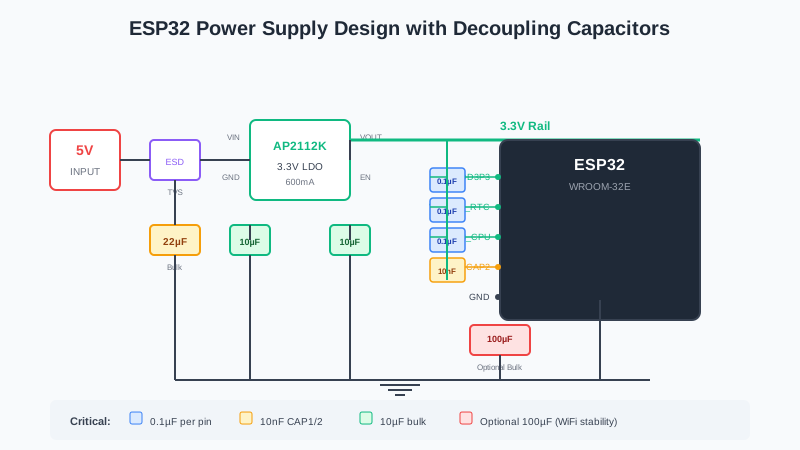
Recommended power supply design with decoupling capacitors
| Location | Value | Type | Purpose |
|---|---|---|---|
| Power entrance | 10-22µF | Ceramic or Tantalum | Bulk storage, ESD protection |
| VDD3P3 rail | 10µF | Ceramic X5R/X7R | WiFi TX current surges |
| Each VDD pin | 0.1µF | Ceramic MLCC | High-frequency filtering |
| CAP1/CAP2 | 10nF | Ceramic ±10% | Internal LDO (required) |
| ADC inputs | 0.1µF | Ceramic | Noise filtering |
| Optional bulk | 100-470µF | Low ESR Electrolytic | Current spike absorption |
LDO Regulator Selection
Choose an LDO with fast transient response. The ESP32's current demand can change from microamps (sleep) to 500mA (WiFi TX) in microseconds.
Avoid These LDOs:
- AMS1117 - Very slow transient response, causes crashes
- LD1117 - Poor response time to current demands
- MCP1702 - Only 500mA peak, marginal for ESP32
Recommended LDOs:
- AP2112K-3.3 - 600mA, fast response, low dropout
- LDL1117-3.3 - Fast transient, works with 10µF X7R
- RT9080-33GJ5 - 600mA, ultra-low dropout
- XC6220B331MR - 700mA, excellent transient response
Brownout Prevention
The ESP32's brownout detector triggers at ~2.44V, resetting the chip if voltage drops below this threshold. Common causes and solutions:
1. Insufficient Power Supply Current
Symptom: Brownout when WiFi starts or during transmission
Fix: Use 5V/1A supply minimum; add 22-100µF bulk capacitor near ESP32
2. Poor USB Cable
Symptom: Works on some computers, not others
Fix: Use short, thick USB cable; avoid cheap cables with thin conductors
3. Missing/Inadequate Decoupling
Symptom: Random resets during operation
Fix: Add 10µF ceramic + 0.1µF ceramic close to each power pin
4. Slow LDO Response
Symptom: Brownout specifically when waking from sleep
Fix: Replace AMS1117/LD1117 with fast-response LDO
Strapping Pins & Boot Modes
The ESP32 reads certain GPIO pins at startup to determine boot mode and other configurations. These "strapping pins" must be handled carefully.
Boot Mode Configuration
| Pin | Default | Function | Design Guideline |
|---|---|---|---|
| GPIO0 | Pull-up | Boot mode: HIGH=Flash, LOW=Download | Add 10K pull-up + BOOT button to GND |
| GPIO2 | Pull-down | Must be LOW or floating for download | Leave floating or pull-down; avoid pull-up |
| GPIO12 (MTDI) | Pull-down | Flash voltage: LOW=3.3V, HIGH=1.8V | Keep LOW for 3.3V flash (most modules) |
| GPIO15 (MTDO) | Pull-up | UART boot messages: LOW=silent | Pull-up for debug messages |
| GPIO5 | Pull-up | SDIO timing | Usually safe to use normally |
Critical: GPIO12 Strapping Issue
If GPIO12 is pulled HIGH at boot, the ESP32 will try to power flash at 1.8V—but most modules use 3.3V flash. This causes boot failure or erratic behavior. Never connect a pull-up to GPIO12 unless you know your flash requires 1.8V.
GPIO0 Circuit Design
GPIO0 needs both a pull-up (for normal boot) and a way to pull it LOW (for download mode):
- 10kΩ pull-up resistor to 3.3V
- BOOT button connecting GPIO0 to GND
- Avoid high-value capacitors (>100nF) that delay the signal
Auto-Reset Circuit (DTR/RTS)
For automatic programming without pressing buttons, implement the auto-reset circuit using DTR and RTS signals from the USB-to-serial converter:
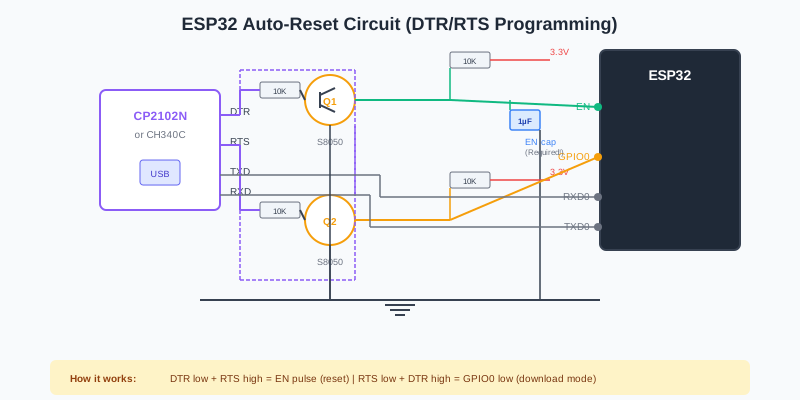
Auto-reset circuit for automatic programming
Key components:
- Two NPN transistors (S8050 or similar)
- 10kΩ resistors for base current limiting
- 1µF-10µF capacitor on EN pin for reliable reset
ESP32-S3/C3/C6 Advantage
Newer ESP32 variants (S3, C3, C6) have built-in USB-serial-JTAG, eliminating the need for external USB-to-serial converters and auto-reset circuits in most cases.
Crystal Oscillator Design
40MHz Crystal Selection
The ESP32 requires a 40MHz crystal with tight specifications:
- Frequency: 40MHz (required, not negotiable)
- Accuracy: ±10 ppm or better
- Load capacitance (CL): Typically 10pF
- ESR: Check datasheet (affects startup reliability)
- Package: 3.2x2.5mm or 2.5x2.0mm common
Load Capacitor Calculation
Calculate external load capacitors using:
C1 = C2 = 2 × CL - Cstray
Where:
- CL = Crystal's load capacitance from datasheet (e.g., 10pF)
- Cstray = PCB stray capacitance (~3-5pF for 4-layer, ~5-7pF for 2-layer)
Example: For a 10pF crystal on a 4-layer PCB:
C1 = C2 = 2 × 10pF - 4pF = 16pF
Use 15pF or 18pF NP0/C0G capacitors
Capacitor Type Matters
Always use NP0/C0G ceramic capacitors for crystal load capacitors. X7R or Y5V dielectrics have temperature-dependent capacitance that causes frequency drift.
Antenna & RF Design
Antenna Options
PCB Antenna (Built-in)
Most modules include a PCB trace antenna.
- + No external components needed
- + Pre-certified RF design
- + Compact solution
- - Limited range (~10-30m indoor)
- - Sensitive to enclosure effects
External Antenna (U.FL/IPEX)
Modules with U.FL connector for external antenna.
- + Extended range possible
- + Antenna outside enclosure
- + Flexible placement options
- - Additional cost and assembly
- - May require re-certification
RF Matching Circuit
For bare chip designs, implement a CLC matching circuit to achieve 50Ω impedance:
- Use 0201 package components for minimal parasitic effects
- Place components in zigzag pattern close to the RF pin
- Typical values: C11 = 1.2-1.8pF, L2 = 2.4-3.0nH, C12 = 1.2-1.8pF
- Add 15 mil stub on first capacitor for harmonic suppression
Keep-Out Zones
Maintaining proper clearance around the antenna is critical for RF performance:
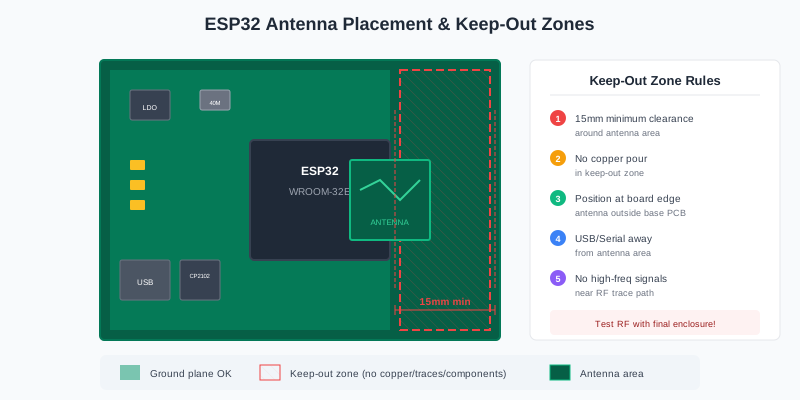
Antenna placement and keep-out zone requirements
- 15mm minimum clearance around antenna area—no copper, components, or traces
- Position antenna at PCB edge, preferably extending beyond the main board
- Keep USB port, serial chip, and UART traces far from antenna
- Avoid placing crystals, DDR, or high-frequency clocks near antenna
- Consider cutting away base board under antenna for best performance
PCB Layout Guidelines
Layer Stackup
Espressif recommends a 4-layer PCB for best RF and EMI performance:
| Layer | Name | Content | Notes |
|---|---|---|---|
| 1 | TOP | Signal traces, components | RF traces, ESP32, decoupling caps |
| 2 | GND | Solid ground plane | NO signal traces—keep solid! |
| 3 | POWER | Power traces, some signals | Keep GND under RF and crystal |
| 4 | BOTTOM | Minimal traces | Avoid components; ground fill |
For 2-layer designs: keep the bottom layer as a solid ground plane with minimal routing. All components on top layer.
Component Placement
- ESP32 module first: Position with antenna at board edge
- Decoupling caps: As close as possible to each power pin
- Crystal: Within 2.7mm of clock pins, with ground vias around
- USB-serial chip: Away from antenna, near USB connector
- LDO regulator: Near power input, with thermal relief
Routing Guidelines
- RF traces: 50Ω controlled impedance, no vias, 135° bends only
- Power traces: ≥25 mil for main, ≥20 mil for VDD3P3
- Ground: Via stitching around RF and crystal areas
- UART: Surround with ground, keep away from antenna
- SPI: Length match within ±50 mil, add series resistors near ESP32
GPIO Reference
Pins to Avoid
Do NOT Use These Pins:
- GPIO6-11: Connected to internal flash—will crash the chip
- GPIO34-39: Input-only, no internal pull-up/down
- GPIO12: Strapping pin—avoid pull-ups at all costs
ADC Considerations
- ADC1 (GPIO32-39): Can be used anytime—preferred for analog
- ADC2 (GPIO0, 2, 4, 12-15, 25-27): Cannot be used while WiFi is active
- Add 0.1µF filter capacitor to each ADC input for noise reduction
- Post-calibration accuracy: ±23mV to ±60mV depending on attenuation
Common Mistakes & Fixes
1. Brownout Resets During WiFi
Cause: Inadequate power supply or slow LDO
Fix: Use 5V/1A supply, add 22-100µF bulk cap, replace AMS1117 with AP2112K
2. Can't Enter Download Mode
Cause: GPIO0 not properly pulled LOW, or GPIO2 pulled HIGH
Fix: Add BOOT button to GPIO0, ensure GPIO2 is floating or LOW
3. Poor WiFi Range
Cause: Antenna blocked by enclosure, ground plane, or components
Fix: Maintain 15mm clearance, position antenna at board edge, test with final housing
4. Chip Won't Boot
Cause: GPIO12 pulled HIGH (wrong flash voltage) or EN floating
Fix: Keep GPIO12 LOW, add 10K pull-up + RC delay on EN
5. Auto-Reset Not Working
Cause: Missing EN capacitor, wrong transistor connections
Fix: Add 1-10µF cap on EN, verify DTR/RTS circuit matches reference design
6. ADC Readings Noisy/Wrong
Cause: Missing filter caps, WiFi interference (ADC2)
Fix: Use ADC1 channels, add 0.1µF filter caps, calibrate in software
Schematic Checklist
Before manufacturing, verify your design against this checklist:
Power Supply
- ☐3.3V supply capable of 500mA minimum
- ☐10µF+ capacitor at power entrance
- ☐0.1µF capacitor at each VDD pin
- ☐10nF capacitors at CAP1/CAP2
- ☐ESD protection at power input
Strapping & Reset
- ☐GPIO0: 10K pull-up + BOOT button
- ☐GPIO2: Floating or pulled LOW
- ☐GPIO12: No pull-up (kept LOW)
- ☐EN: 10K pull-up + RC delay circuit
- ☐Auto-reset circuit if using USB-serial
Crystal & RF
- ☐40MHz crystal with ±10ppm accuracy
- ☐Load capacitors calculated for crystal CL
- ☐Antenna area free of copper/components (15mm)
- ☐Module antenna at board edge
GPIO
- ☐No connections to GPIO6-11 (flash pins)
- ☐ADC inputs have 0.1µF filter caps
- ☐Input-only pins (34-39) have external pull resistors if needed
Minimal Design Example
Here's a minimal schematic for an ESP32-WROOM-32E module:
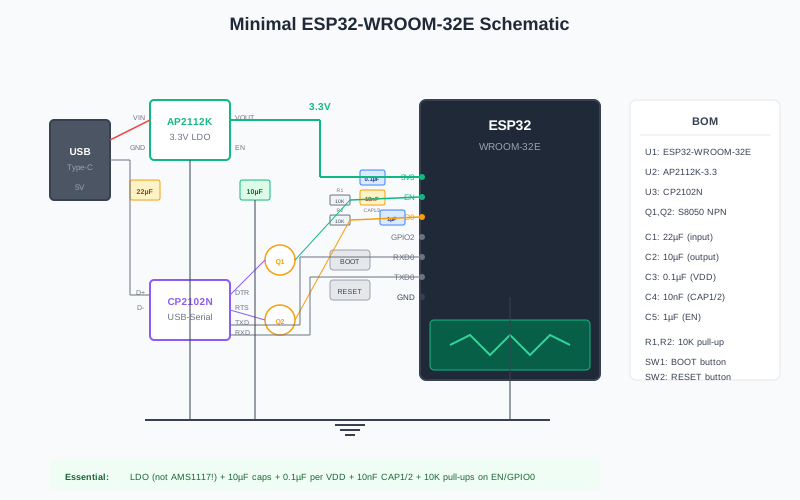
Minimal circuit for ESP32-WROOM-32E with programming interface
Essential Components:
- U1: ESP32-WROOM-32E module
- U2: AP2112K-3.3 LDO regulator
- U3: CP2102N or CH340C USB-serial converter
- C1-C4: 10µF + 0.1µF decoupling capacitors
- R1-R3: 10K pull-up resistors (EN, GPIO0, GPIO2)
- Q1-Q2: S8050 transistors for auto-reset
- SW1: BOOT button (GPIO0 to GND)
- SW2: RESET button (EN to GND)
Frequently Asked Questions
Q: Can I use a 2-layer PCB for ESP32?
Yes, but keep the bottom layer as a solid ground plane with minimal traces. You'll need wider RF traces (~20 mil) and careful component placement. 4-layer is recommended for better RF performance and easier routing.
Q: Why does my ESP32 reset when WiFi connects?
WiFi transmission draws up to 500mA, causing voltage drops if the power supply can't respond fast enough. Add bulk capacitors (22-100µF) near the ESP32 and use a fast-response LDO. Never use AMS1117.
Q: Do I need the CAP1/CAP2 capacitors?
Yes, they are required. These 10nF capacitors are for the internal LDO regulator. The ESP32 won't operate reliably without them.
Q: Why can't I use ADC2 while WiFi is running?
ADC2 shares internal circuitry with the WiFi radio. When WiFi is active, ADC2 is unavailable. Use ADC1 channels (GPIO32-39) for analog measurements in WiFi applications.
Q: Should I use ESP32-WROOM-32 or ESP32-WROOM-32E?
Always use the "E" version (ESP32-WROOM-32E). The original ESP32-WROOM-32 uses older silicon with known bugs that can cause random crashes and power-up issues.
Conclusion
Designing reliable ESP32 hardware requires attention to several critical areas: robust power supply with proper decoupling, correct strapping pin configuration, appropriate antenna clearance, and careful PCB layout. By following the guidelines in this tutorial, you'll avoid the common pitfalls that cause brownouts, WiFi issues, and boot failures.
Key takeaways:
- Use ESP32-WROOM-32E or newer modules—avoid the original WROOM-32
- Budget 500mA minimum for power supply; use fast LDOs like AP2112K
- Never pull GPIO12 HIGH—it changes flash voltage and causes boot failures
- Maintain 15mm clearance around the antenna area
- Use 4-layer PCBs when possible; keep a solid ground plane on layer 2
- Add proper decoupling: 10µF bulk + 0.1µF per pin + 10nF on CAP1/CAP2
Validate Your ESP32 Design
Use Schemalyzer to analyze your EasyEDA schematics before manufacturing. Our AI-powered analysis catches common ESP32 design mistakes like missing decoupling capacitors, incorrect strapping pin configurations, and power supply issues.