Table of Contents
Your schematic is more than a technical document—it's your primary communication tool. A well-designed schematic can be understood in seconds, while a poorly designed one can take hours to decode. These 30 best practices will help you create schematics that are clear, professional, and error-resistant.
Key Principle
"A schematic is meant to communicate information to human readers." Clarity matters more than compactness. Your schematic should tell a story that any engineer can follow.
1. Why Schematic Best Practices Matter
Professional schematics aren't just easier to read—they directly impact your project's success:
- Fewer PCB layout errors – Clear schematics reduce misinterpretation during layout
- Faster debugging – When issues arise, you can trace signals quickly
- Better team collaboration – Others can review and modify without confusion
- Future maintenance – You'll thank yourself in 6 months
- Professional credibility – Sloppy schematics suggest sloppy engineering
Industry Reality
"Neatness directly influences how seriously others review your work. A sloppy schematic suggests disrespect for readers' time." – Electrical Engineering Stack Exchange
2. Signal Flow and Layout Conventions
The most fundamental principle: signals should flow in a predictable direction that readers can follow intuitively.
Rule #1: Left-to-Right Signal Flow
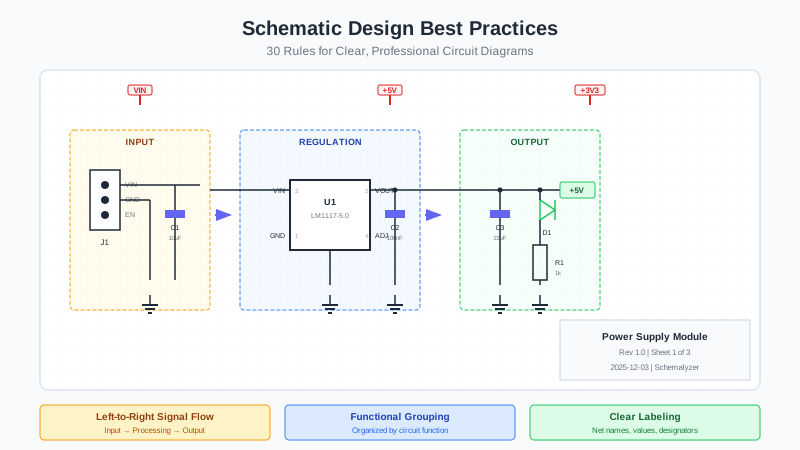
Arrange circuits so signals flow from left to right, matching how we read text. Inputs on the left, outputs on the right.
Signal Flow Direction:
INPUT (left) → PROCESSING → OUTPUT (right)
Example:
Sensor → Amplifier → ADC → Microcontroller → DAC → Driver → Motor
Rule #2: Vertical Voltage Convention
Higher voltages at the top, lower voltages (ground) at the bottom. This matches the intuitive "water flows downhill" mental model.
- Top: VCC, VDD, +12V, +5V, +3.3V
- Middle: Signal paths, components
- Bottom: GND, VSS, negative rails
Rule #3: Feedback Flows Opposite
When showing feedback paths (common in power supplies and op-amps), route them flowing right-to-left to clearly distinguish from forward signal paths.

3. Component Placement and Grouping
Rule #4: Group by Function
Organize components into logical functional blocks. Draw rectangles or use visual separation to delineate each section.
- Power supply section
- Input conditioning
- Microcontroller and peripherals
- Communication interfaces
- Output drivers
- Protection circuitry
Rule #5: Block Diagrams for Complex Systems
For multi-sheet schematics, include a top-level block diagram showing the system architecture. This helps readers understand the big picture before diving into details.
Rule #6: Use Consistent Grid Spacing
Align all components to a consistent grid (typically 100 mil or 2.54mm). This creates visual order and makes connections cleaner.
EasyEDA Tip
In EasyEDA, set your grid to 100 mil (View → Grid Settings) and use Snap to Grid (G key) to ensure consistent placement.
Rule #7: Position Decoupling Capacitors Near ICs
Place decoupling capacitors visually adjacent to their associated IC. This shows design intent and helps verify proper placement during PCB layout.
4. Wire and Connection Management
Rule #8: Minimize Wire Crossings
Rearrange components to minimize crossed wires. When crossings are unavoidable, make sure the crossing point doesn't have a junction dot—this indicates wires pass over each other without connecting.
Rule #9: Use Junction Dots Consistently
Every actual connection must have a visible junction dot. This prevents ambiguity about whether wires are connected or just crossing.
Critical Rule
Prefer T-junctions over 4-way crosses. A 4-way junction with a dot can be mistaken for a crossing without connection if the dot is small or obscured.
Rule #10: Wire Exit Points
Advance at least one grid point straight from a symbol pin before changing direction. This creates cleaner connections and easier modifications.
Rule #11: Use Buses for Grouped Signals
For multi-bit data lines (address bus, data bus), use bus notation to reduce clutter. Label individual signals where they connect to components.
Bus Naming Convention:
DATA[7:0] – 8-bit data bus
ADDR[15:0] – 16-bit address bus
GPIO[0:3] – 4 GPIO pins
5. Labeling and Naming Conventions
Rule #12: Label Every Component
Every component must have a reference designator (R1, C5, U3) and value or part number. No exceptions.
| Component Type | Prefix | Example |
|---|---|---|
| Resistor | R | R1, R2, R100 |
| Capacitor | C | C1, C5, C200 |
| Inductor | L | L1, L2 |
| Diode/LED | D | D1, D5 |
| Transistor | Q | Q1, Q2 |
| IC/Integrated Circuit | U | U1, U3 |
| Connector | J or P | J1, P2 |
| Switch | SW | SW1, SW2 |
| Crystal | Y | Y1 |
| Fuse | F | F1 |
| Test Point | TP | TP1, TP_VCC |
Rule #13: Use Descriptive Net Names
Name important signals with descriptive labels that explain their function, not just their source.
Good Net Names:
SPI_MOSI, I2C_SDA, UART_TX, PWM_MOTOR, ADC_TEMP
Avoid:
NET1, WIRE5, PIN3 (meaningless)
U1_PIN5 (describes connection, not function)
Rule #14: Consistent Case and Style
- Use UPPERCASE for net names:
CLOCK,RESET - Active-low signals:
RESET_Nor/RESETornRESET - Pick one style and stick with it throughout the design
- Don't mix formats: avoid having both
VDDand3V3
Rule #15: No Vertical Text
Keep all text horizontal and readable. Rotate components if needed, but never rotate labels to be vertical or upside-down.
6. Symbols and IEEE Standards
Rule #16: Use Standard Symbol Libraries
Follow IEEE standards for component symbols to ensure universal recognition:
- IEEE 315: Graphic symbols for electrical and electronics diagrams
- IEEE 91: Graphic symbols for logic functions
- IEEE 991: Logic circuit diagrams
Rule #17: Mark Polarity Clearly
For polarized components, ensure polarity is unambiguous:
- Electrolytic capacitors: Use + symbol, not just curved line
- Diodes: Ensure cathode bar is visible
- LEDs: Add + or − or use arrow indicating current flow
- Batteries: Positive terminal always longer line
Rule #18: Show Pin Numbers
Display pin numbers on all IC symbols. This is essential for verification and debugging.
7. Power and Ground Design
Rule #19: Use Power Symbols, Not Wires
Connect power and ground using standardized symbols rather than drawing wires across the schematic. This reduces clutter and makes the signal path clearer.
Standard Power Symbols:
VCC, VDD – Positive supply
GND, VSS – Ground reference
AGND, DGND – Analog/Digital ground (if separated)
+3V3, +5V, +12V – Specific voltage rails
Rule #20: Distinguish Analog and Digital Grounds
In mixed-signal designs, use different symbols for analog ground (AGND) and digital ground (DGND). Show where they connect at a single point.
Rule #21: Show Power Entry and Distribution
Include a clear power input section showing:
- Input connector or jack
- Protection (fuse, TVS, reverse polarity)
- Regulation (LDO, SMPS)
- Decoupling at the regulator output
- Distribution to different voltage rails
8. Decoupling and Protection
Rule #22: Show All Decoupling Capacitors
Never hide decoupling capacitors as "assumed." Every IC should have its decoupling capacitors visible in the schematic.
Typical Decoupling Strategy:
100nF ceramic – Close to each IC power pin
10μF ceramic – At voltage regulator output
100μF electrolytic – At power entry
High-Speed ICs (MCUs, FPGAs):
100nF + 10nF or 100nF + 1μF at each power pin
Rule #23: Include Protection Circuits
Document protection against:
- ESD: TVS diodes on exposed I/O
- Reverse polarity: Diode or P-FET protection
- Overvoltage: Zener clamps or voltage limiters
- Overcurrent: Fuses or PTC resettable fuses
- Inductive kickback: Flyback diodes on relays and motors
Rule #24: Pull-Up and Pull-Down Resistors
Show all pull-up and pull-down resistors explicitly. Include their connection to the appropriate voltage rail.
I2C Reminder
I2C buses require pull-up resistors on SDA and SCL (typically 2.2kΩ–10kΩ). Always show these in your schematic.
9. IC and Complex Component Design
Rule #25: Arrange IC Pins by Function
IC symbols should organize pins by function, not physical package location:
- Left side: Inputs
- Right side: Outputs
- Top: Power (VCC, VDD)
- Bottom: Ground (GND, VSS)
Avoid Physical Pin Layout
Never draw IC symbols with pins in their physical DIP/QFP positions. This makes the circuit unreadable and defeats the purpose of a schematic.
Rule #26: Account for All IC Pins
Every IC pin must be shown in the schematic, including:
- Unused inputs – Tie to appropriate voltage
- NC (No Connect) pins – Show but leave unconnected
- Exposed pads – Connect to GND or as specified
- All power and ground pins – Don't hide any
Rule #27: Include Test Points and Debug Headers
For prototype schematics, add:
- Test points on critical signals (TP1, TP2, etc.)
- Programming headers (JTAG, SWD, ICSP)
- Serial debug ports (UART TX/RX)
- LED indicators for power rails
10. Documentation and Annotation
Rule #28: Add Design Notes
Include text annotations for:
- Calculations (resistor divider ratios, current limits)
- Datasheet references ("Per MAX17048 datasheet, Fig. 3")
- Configuration options ("Install R5 for 5V output")
- Critical values ("R1 must be <100Ω for ESD compliance")
Rule #29: Use Title Blocks
Every schematic sheet should include:
- Project name and board revision
- Sheet number and title (e.g., "3/5: Power Supply")
- Designer name and date
- Company logo (if applicable)
- Revision history or change notes
Rule #30: Design for Standard Page Sizes
Use standard page sizes (A4, Letter, A3) that can be easily printed or viewed. If your design doesn't fit, split into multiple sheets rather than using oversized pages.
11. Verification and Design Rule Checks
Before finalizing your schematic, run through these verification steps:
Electrical Rule Check (ERC)
- No unconnected pins (unless intentional)
- No shorted outputs
- All inputs driven
- Power and ground connections verified
Visual Inspection
- All component values shown
- No overlapping text
- Junction dots at all connections
- Consistent symbol styles
Functional Verification
- Signal flow is logical
- All required features are included
- Protection circuits present
- Power budget calculated
12. EasyEDA-Specific Tips
EasyEDA Best Practices
- Grid Settings: Use 100mil grid for placement, 50mil for fine adjustments
- Net Names: Double-click wires to add net labels quickly
- Power Ports: Use the built-in VCC/GND symbols from the library
- Multi-sheet: Right-click project → Add Schematic for additional sheets
- Design Rules: Run Design → Check ERC before PCB conversion
- Annotations: Use the Text tool (T) for design notes
- Frame: Add a sheet frame from System library for professional look
13. Quick Reference Checklist
30 Schematic Design Rules at a Glance
Signal Flow & Layout
- Left-to-right signal flow
- Top-high, bottom-low voltage convention
- Feedback flows opposite direction
- Group components by function
- Include block diagrams for complex systems
- Use consistent grid spacing
- Place decoupling near ICs
Wires & Connections
- Minimize wire crossings
- Use junction dots consistently
- Straight exit from pins
- Use buses for grouped signals
Labeling & Standards
- Label every component
- Use descriptive net names
- Consistent case and style
- No vertical text
- Use standard IEEE symbols
- Mark polarity clearly
- Show pin numbers
Power & Protection
- Use power symbols, not wires
- Distinguish analog/digital grounds
- Show power distribution
- Show all decoupling capacitors
- Include protection circuits
- Show pull-up/pull-down resistors
ICs & Complex Parts
- Arrange IC pins by function
- Account for all IC pins
- Include test points and headers
Documentation
- Add design notes
- Use title blocks
- Design for standard page sizes
Verify Your Schematics Automatically
Schemalyzer uses AI to analyze your EasyEDA schematics for best practice violations, missing components, and potential design issues. Get instant feedback on your designs.
Try Schemalyzer Free