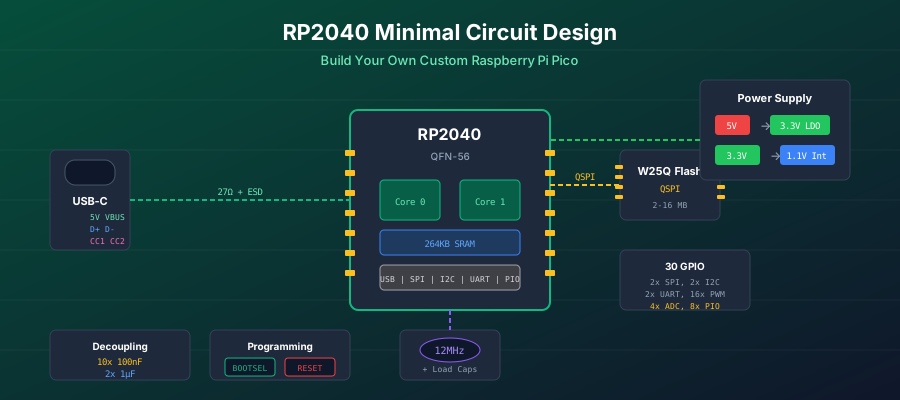
Introduction
The RP2040 is Raspberry Pi's first silicon, and it's become incredibly popular for custom hardware projects. While the Raspberry Pi Pico board is great for prototyping, many projects require custom form factors, different I/O configurations, or cost-optimized designs for production.
This guide provides everything you need to design your own RP2040-based circuit board from scratch. We'll cover the minimal circuitry required, explain each design decision, and provide JLCPCB-ready part numbers so you can go from schematic to assembled board quickly.
Prerequisites: This guide assumes basic familiarity with PCB design tools (EasyEDA, KiCad, or Altium) and fundamental electronics concepts like decoupling and signal routing.
Why Design with the RP2040?
Advantages
- +Dual ARM Cortex-M0+ cores @ 133MHz
- +264KB SRAM (more than most Cortex-M0 chips)
- +Programmable I/O (PIO) state machines
- +UF2 drag-and-drop programming via USB
- +Low cost (~$0.70-1.00 in volume)
- +Excellent documentation from Raspberry Pi
Considerations
- !No internal flash - requires external QSPI
- !QFN-56 package requires careful soldering
- !Only USB bootloader (no UART boot)
- !Single GND pad under chip - critical to solder
- !12-bit ADC (no DAC, 4 channels)
Minimum Circuit Requirements
Unlike many microcontrollers that can run with just power and a few capacitors, the RP2040 has specific requirements for a functional system:
Required Components
Essential
- 1x RP2040 microcontroller
- 1x External QSPI flash (2MB-16MB)
- 1x 12MHz crystal + 2 load capacitors
- 1x 3.3V voltage regulator
- 11x 100nF decoupling capacitors
- 2x 1µF capacitors (VREG in/out)
For USB Programming
- 1x USB connector (Type-C recommended)
- 2x 27Ω USB series resistors
- 2x 5.1kΩ CC resistors (USB-C)
- 1x BOOTSEL button
- 1x 1kΩ BOOTSEL resistor
- 1x ESD protection (recommended)
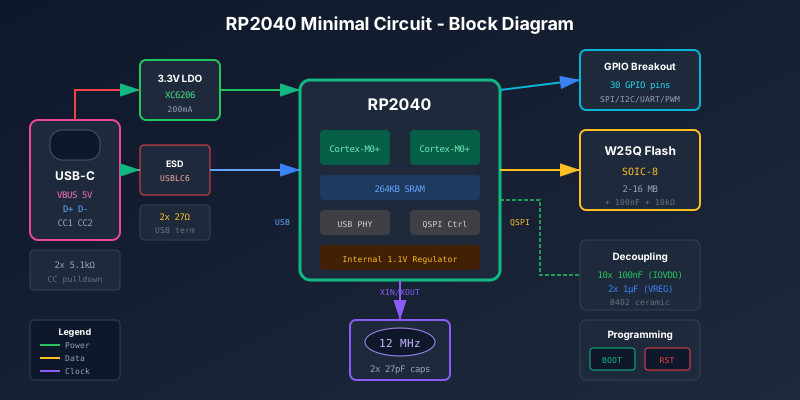
System Block Diagram
Before diving into each subsystem, here's how all the pieces connect:
Power Supply Design
Power Architecture Overview
The RP2040 requires two voltage rails to operate:
- IOVDD (3.3V) - Powers all I/O, USB PHY, and peripherals
- DVDD (1.1V) - Powers the digital core (ARM cores, SRAM)
The RP2040 includes an internal linear regulator that generates 1.1V from the 3.3V supply. This simplifies external power design - you only need to provide 3.3V.
Internal 1.1V Regulator
The internal regulator requires:
- VREG_VIN - Connect to 3.3V with 1µF capacitor
- VREG_VOUT - Connect to all DVDD pins with 1µF capacitor
Battery Applications: The internal LDO is efficient when the core is sleeping, but for high-workload battery applications, consider an external switching 1.1V supply for better efficiency.
External 3.3V Supply Options
For USB-powered designs, you need to convert 5V USB to 3.3V:
| Regulator | Type | Current | JLCPCB | Notes |
|---|---|---|---|---|
| XC6206P332MR | LDO | 200mA | C5446 | Recommended - Basic Part |
| AP2112K-3.3 | LDO | 600mA | C51118 | Popular choice (SparkFun, Adafruit) |
| ME6211C33 | LDO | 500mA | C82942 | Low dropout (100mV @ 500mA) |
Avoid AMS1117: Despite its popularity, the AMS1117 has high quiescent current (~5mA), requires large capacitors, and has poor performance at low load. Use XC6206 or AP2112K instead.
Decoupling Capacitors
Proper decoupling is critical for RP2040 stability. The chip has multiple power pins that each need their own capacitor:
| Pins | Count | Value | Purpose |
|---|---|---|---|
| IOVDD (pins 1,10,22,33,42,49) | 6x | 100nF | I/O power decoupling |
| DVDD (pins 23, 50) | 2x | 100nF | Core power decoupling |
| USB_VDD (pin 48) | 1x | 100nF | USB PHY power |
| ADC_AVDD (pin 43) | 1x | 100nF | ADC reference |
| VREG_VIN (pin 44) | 1x | 1µF | Regulator input |
| VREG_VOUT (pin 45) | 1x | 1µF | Regulator output |
Layout Critical: The RP2040 has only one ground connection - the large pad in the center of the chip. All decoupling capacitors must have the shortest possible loop from capacitor → power pin → through chip → center GND pad → back to capacitor. Use vias directly under capacitors to the ground plane.
Crystal Oscillator
While the RP2040 has an internal oscillator, an external 12MHz crystal is required for accurate USB timing and stable operation.
Crystal Selection
The crystal must meet these specifications:
- Frequency: 12.000 MHz
- Load Capacitance: Typically 10-20pF
- ESR: <100Ω recommended
- Frequency Tolerance: ±30ppm or better
Recommended Crystal
JLCPCB Part: C9002
12MHz, 3225 package (3.2mm × 2.5mm), 20pF load capacitance, ±10ppm. This is a JLCPCB Basic Part, keeping assembly costs low.
Load Capacitor Calculation
The load capacitors (CL1 and CL2) must be calculated based on the crystal's specified load capacitance and PCB stray capacitance:
C_load = (CL1 × CL2) / (CL1 + CL2) + C_stray

For equal capacitors (CL1 = CL2 = C):
C = 2 × (C_load - C_stray)

Example with 20pF load capacitance and 3pF stray:
C = 2 × (20pF - 3pF) = 34pF

Nearest standard values: 33pF or 27pF
Common Load Capacitor Values
| Crystal CL | Load Caps (each) | JLCPCB Part |
|---|---|---|
| 10pF | 15pF | C1644 |
| 12pF | 18pF | C1645 |
| 20pF | 33pF | C1663 |
Crystal Layout Guidelines
- Place crystal as close as possible to XIN/XOUT pins (pins 20/21)
- Keep load capacitors immediately adjacent to crystal pads
- Route XIN/XOUT traces away from high-speed signals (especially QSPI)
- Consider a ground guard ring around the crystal for noise immunity
- Keep the crystal on the opposite side of the chip from QSPI flash
QSPI Flash Memory
The RP2040 has no internal flash memory - all program code runs from an external QSPI flash chip. This is a critical component that must be chosen and connected carefully.
Flash Chip Selection
The RP2040 bootloader is optimized for Winbond W25Q series flash. While other chips may work, Winbond is the safest choice:
| Part Number | Size | Package | JLCPCB | Notes |
|---|---|---|---|---|
| W25Q16JVSNIQ | 2MB | SOIC-8 | C131024 | Minimum recommended |
| W25Q32JVSSIQ | 4MB | SOIC-8 | C179171 | Good for larger projects |
| W25Q128JVSIQ | 16MB | SOIC-8 | C97521 | Maximum supported |
Warning: Macronix and some other flash chips do not work as drop-in replacements. Stick with Winbond W25Q series for guaranteed compatibility.
Flash Connections
| Flash Pin | RP2040 Pin | Function |
|---|---|---|
| 1 (/CS) | QSPI_SS (pin 57) | Chip Select |
| 2 (DO/IO1) | QSPI_SD1 (pin 53) | Data Out / IO1 |
| 3 (/WP/IO2) | QSPI_SD2 (pin 54) | Write Protect / IO2 |
| 4 (GND) | GND | Ground |
| 5 (DI/IO0) | QSPI_SD0 (pin 52) | Data In / IO0 |
| 6 (CLK) | QSPI_SCLK (pin 56) | Clock |
| 7 (/HOLD/IO3) | QSPI_SD3 (pin 55) | Hold / IO3 |
| 8 (VCC) | 3.3V | Power (with 100nF cap) |
QSPI_SS Pull-up: Add a 10kΩ pull-up resistor from QSPI_SS to 3.3V. This ensures the flash chip-select is high during power-up, preventing the flash from entering an undefined state.
Flash Layout Guidelines
- Place flash as close as possible to RP2040 QSPI pins
- Maximum trace length: 20mm (shorter is better)
- Recommended trace width: 0.15mm (6 mil)
- Keep clock trace as the longest among all QSPI signals
- Add 100nF decoupling capacitor directly at flash VCC pin
- Maintain solid ground plane under flash and traces
USB Interface
USB is the primary programming interface for the RP2040, enabling the convenient UF2 drag-and-drop firmware upload.
USB-C Connector Design
For modern designs, USB-C is recommended over Micro-USB due to its reversibility and durability. Key connections:
| USB-C Pin | Connection | Notes |
|---|---|---|
| VBUS (A4, B4, A9, B9) | 5V input | To voltage regulator |
| D+ (A6, B6) | RP2040 USB_DP via 27Ω | Tie A6 and B6 together |
| D- (A7, B7) | RP2040 USB_DM via 27Ω | Tie A7 and B7 together |
| CC1 (A5) | 5.1kΩ to GND | Device detection |
| CC2 (B5) | 5.1kΩ to GND | Device detection |
| GND (A1, A12, B1, B12) | Ground | Connect all GND pins |
Critical: Both CC1 and CC2 must have separate 5.1kΩ resistors to ground. Never tie CC1 and CC2 together - this violates the USB-C spec and causes detection issues. (This was the Raspberry Pi 4B launch bug.)
ESD Protection
While not strictly required, ESD protection on USB lines is highly recommended for any product that will be handled by users:
Recommended ESD Protection
USBLC6-2SC6: TVS diode array for D+/D- lines
JLCPCB Part: C7519
Protects against ±15kV contact discharge and ±8kV air discharge. Low capacitance (0.5pF typ) preserves signal integrity.
USB Trace Layout
USB is a differential signal requiring controlled impedance:
- Target impedance: 90Ω differential
- Trace width: 0.8mm (for 1.6mm board thickness)
- Trace spacing: 0.15mm between D+ and D-
- 27Ω series resistors: Place close to RP2040 pins
- Length matching: Keep D+ and D- equal length
Boot Mode Circuit
The RP2040 uses a ROM-based bootloader that checks the BOOTSEL condition at power-up. Understanding the boot sequence is essential for designing a reliable programming interface.
BOOTSEL Button Design
The BOOTSEL function uses the QSPI_SS pin. When QSPI_SS is held low during reset, the RP2040 enters USB mass storage mode for firmware upload:
QSPI_SS (pin 57)
    |
    +--- 10kΩ pull-up to 3.3V (optional but recommended)
    |
    +--- 1kΩ series resistor --- BOOTSEL button --- GND

Boot Sequence:
1. Press and hold BOOTSEL button
2. Apply power (or press RESET while holding BOOTSEL)
3. RP2040 sees QSPI_SS low → enters USB boot mode
4. Release button
5. Drag UF2 file to the USB drive
Why the 1kΩ resistor? The series resistor limits current when the QSPI_SS pin is being driven as an output during normal operation. Without it, pressing the button during operation would short the output to ground.
Reset Circuit
The RUN pin (pin 26) is the RP2040's reset input (active-low):
RUN (pin 26)
    |
    +--- 10kΩ pull-up to 3.3V
    |
    +--- 100nF capacitor to GND (debounce/filter)
    |
    +--- RESET button --- GND

Typical use:
1. Power-on: RUN pulled high, chip starts
2. Press RESET: RUN pulled low, chip resets
3. Release: RUN returns high, chip restarts
4. For BOOTSEL mode: Hold BOOTSEL, press RESET
GPIO Breakout
The RP2040 provides 30 GPIO pins with flexible peripheral mapping. For a minimal design, consider which GPIOs to expose:
| GPIO | Pin | Common Functions |
|---|---|---|
| GPIO0-1 | 2, 3 | UART0 TX/RX, I2C0, SPI0 |
| GPIO2-5 | 4-7 | SPI0, I2C1, PWM |
| GPIO6-9 | 8-11 | SPI0, I2C0/1, PWM |
| GPIO10-13 | 12-15 | SPI1, I2C0/1, PWM |
| GPIO14-17 | 16-19 | SPI1, I2C0/1, PWM |
| GPIO18-21 | 24-27 | SPI0, I2C0/1, PWM |
| GPIO22-25 | 29-32 | PWM, PIO, LED (GPIO25 on Pico) |
| GPIO26-29 | 34-37 | ADC0-3, PWM |
Tip: Reserve GPIO0/GPIO1 for UART debugging - they're the default UART0 pins and extremely useful for serial output during development.
PCB Layout Guidelines
Layer Stackup
The official minimal design uses a 2-layer board, but 4-layer is recommended for better performance and easier routing:
2-Layer (Budget)
- Layer 1: Signals + components
- Layer 2: Ground plane + power routing
- Challenge: Power distribution under RP2040
- Route 1.1V and 3.3V in remaining space
4-Layer (Recommended)
- Layer 1: Signals + components
- Layer 2: Solid GND plane
- Layer 3: 3.3V power plane
- Layer 4: Signals + 1.1V routing
- Better decoupling and EMI performance
Ground Plane Strategy
The RP2040's center ground pad is the only ground connectionfor the entire chip. This makes ground plane design critical:
- Use 9 vias minimum under the ground pad for thermal and electrical connection
- Create solid ground plane directly under the RP2040
- Connect all decoupling capacitor grounds to this plane with vias
- Maintain continuous ground under QSPI traces
- Use ground stitching vias around the perimeter
Critical Signal Routing
| Signal Group | Max Length | Trace Width | Notes |
|---|---|---|---|
| QSPI (flash) | 20mm | 0.15mm | CLK longest, solid GND under |
| USB D+/D- | 50mm | 0.8mm | Differential pair, 0.15mm spacing |
| Crystal XIN/XOUT | 5mm | 0.2mm | Keep away from QSPI |
| Power (3.3V, 1.1V) | - | 0.3mm+ | Short to decoupling caps |
Bill of Materials
JLCPCB Basic Parts
Using JLCPCB Basic Parts minimizes assembly fees ($3 per Extended part type). Here are basic parts where possible:
Complete BOM
| Ref | Value | Package | JLCPCB Part | Type |
|---|---|---|---|---|
| Core Components | ||||
| U1 | RP2040 | QFN-56 | C2040 | Extended |
| U2 | W25Q16JVSNIQ | SOIC-8 | C131024 | Extended |
| U3 | XC6206P332MR | SOT-23 | C5446 | Basic |
| Y1 | 12MHz | 3225 | C9002 | Basic |
| Capacitors | ||||
| C1-C10 | 100nF | 0402 | C1525 | Basic |
| C11-C12 | 1µF | 0402 | C52923 | Basic |
| C13-C14 | 27pF | 0402 | C1557 | Basic |
| Resistors | ||||
| R1-R2 | 27Ω | 0402 | C25100 | Basic |
| R3-R4 | 5.1kΩ | 0402 | C25905 | Basic |
| R5-R6 | 10kΩ | 0402 | C25744 | Basic |
| R7 | 1kΩ | 0402 | C11702 | Basic |
| Connectors & Buttons | ||||
| J1 | USB-C | 16-pin | C2765186 | Extended |
| SW1-SW2 | Button | 3x6mm | C318884 | Basic |
Estimated cost: ~$2-3 per board for components (5 board minimum), plus ~$5 assembly fee + ~$3 per extended part type.
Common Mistakes to Avoid
1. Poor Ground Pad Connection
The center pad is the ONLY ground connection. If not properly soldered with sufficient via connections, nothing works. Use reflow soldering or hot air rework to ensure proper connection.
2. Wrong Flash Chip
Using non-Winbond flash chips often causes boot failures. Stick with W25Q series. If using a different chip, ensure it supports the exact same command set and power-up timing.
3. Missing QSPI_SS Pull-up
During power-up, QSPI_SS may float briefly. Without a pull-up, the flash chip may enter an undefined state, causing boot failures.
4. CC1/CC2 Tied Together (USB-C)
Each CC pin needs its own 5.1kΩ resistor. Tying them together violates USB-C spec and causes intermittent detection issues.
5. Crystal Too Far from RP2040
Long traces add stray capacitance, changing the effective load capacitance. This causes frequency errors that break USB timing.
Testing and Debugging
After assembly, follow this testing sequence:
- Visual inspection: Check for solder bridges, especially on the RP2040 and USB connector. The QFN-56 package is prone to bridging.
- Power check (no USB): Measure 3.3V and 1.1V rails before connecting USB. Verify they're stable and correct voltage.
- BOOTSEL test: Hold BOOTSEL, connect USB. Computer should show a new USB drive called "RPI-RP2".
- Flash test: Drag a UF2 file (like the Pico blink example) to the drive. It should disappear and the code should run.
- UART test: Connect a USB-UART adapter to GPIO0/GPIO1 and verify serial output works.
Board stuck in BOOTSEL mode? This usually means the flash chip isn't responding - check flash connections, power, and chip selection. The bootloader only enters USB mode if it can't read valid code from flash OR if BOOTSEL is held during reset.
Conclusion
Designing a custom RP2040 board requires attention to detail in power supply, flash memory, crystal, and USB circuits. However, with the excellent documentation from Raspberry Pi and the growing community of open-source designs, it's an achievable project for anyone with basic PCB design experience.
The key points to remember:
- Use Winbond W25Q series flash for guaranteed compatibility
- Pay special attention to the center ground pad connection
- Keep QSPI traces short and crystal close to the chip
- Don't skimp on decoupling capacitors
- Include BOOTSEL and RESET buttons for easy programming
Download Raspberry Pi's official KiCad minimal design files as a starting point, and don't hesitate to reference other open-source RP2040 projects for inspiration.