TL;DR
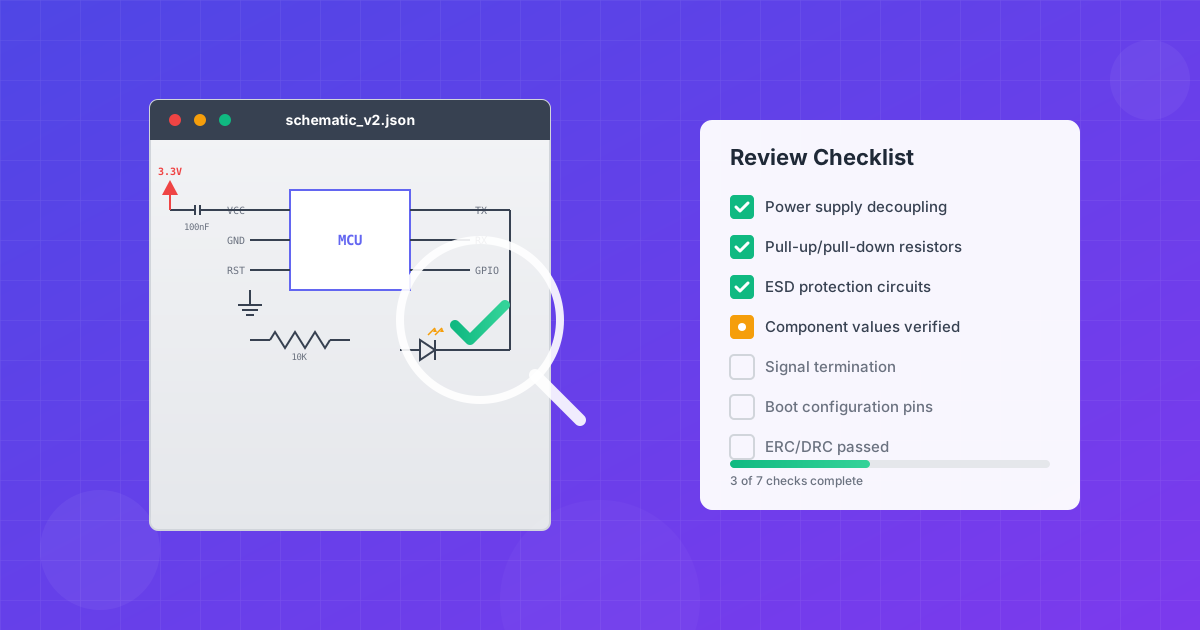
Effective schematic review follows a systematic 4-phase approach: (1) High-level architecture overview, (2) Block-by-block analysis, (3) Component-level verification, and (4) Automated ERC/DRC checks. Focus on power integrity, signal connections, protection circuits, and proper documentation. Catching errors at the schematic stage costs 10-100x less than fixing them after PCB fabrication.
Introduction
A schematic is the blueprint of your electronic design. Every trace on your PCB, every component placement decision, and ultimately the functionality of your final product traces back to this foundational document. Yet many engineers treat schematic review as a quick formality before rushing to PCB layout.
This comprehensive guide will transform how you approach schematic review. Whether you're a junior engineer learning the fundamentals or a senior designer looking to formalize your review process, you'll learn the systematic techniques that professional engineering teams use to catch errors before they become expensive problems.
Why Schematic Review Matters
Schematic review isn't just about finding obvious errors like unconnected pins. It's about validating your entire design intent, ensuring manufacturability, and building a foundation for reliable products.
The Cost of Catching Errors Late
The "Rule of 10" in electronics manufacturing states that the cost to fix an error multiplies by approximately 10x at each stage of development:
| Stage | Relative Cost | Example Impact |
|---|---|---|
| Schematic Design | 1x | Simple edit, minutes to fix |
| PCB Layout | 10x | Re-routing, possible re-spin |
| Prototype | 100x | Board re-spin, weeks delay |
| Production | 1000x | Recall, reputation damage |
A missing decoupling capacitor caught during schematic review is a 30-second fix. The same error discovered during prototype debugging might cost days of troubleshooting plus a board re-spin. Found in production? You're looking at a recall.
The Systematic Review Process
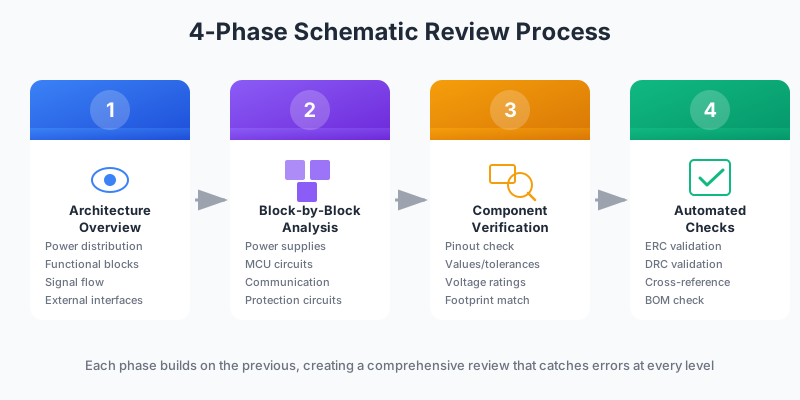
Professional schematic review follows a structured, multi-phase approach. This isn't about randomly scanning the schematic hoping to spot errors—it's about systematically verifying every aspect of the design.
Phase 1: High-Level Architecture Review
Start with the big picture. Before diving into individual components, understand the overall system architecture:
- Power distribution: Identify all power rails and their relationships. What voltages exist? How do they sequence?
- Major functional blocks: MCU, power supplies, sensors, communication interfaces, user interface elements
- Signal flow: How does data move through the system? Input → Processing → Output
- External interfaces: What connects to the outside world? USB, Ethernet, GPIO headers, connectors
Pro Tip
Request a block diagram before the schematic review. Compare the schematic against this high-level design to ensure nothing was lost in translation.
Phase 2: Block-by-Block Analysis
Divide the schematic into logical functional blocks and review each independently:
- Power supply section(s)
- Microcontroller and supporting circuitry
- Communication interfaces (USB, I2C, SPI, UART, etc.)
- Analog signal conditioning
- Protection and filtering circuits
- Connectors and external interfaces
- User interface elements (LEDs, buttons, displays)
For each block, verify that it matches reference designs or application notes from the component manufacturer. Pay special attention to any deviations—they should be intentional and documented.
Phase 3: Component-Level Verification
Now examine individual components with a fine-tooth comb:
- Verify every symbol pinout against the datasheet
- Check component values and tolerances
- Confirm voltage and current ratings
- Validate footprint assignments
- Ensure proper part numbers are specified
Phase 4: Automated Checks (ERC/DRC)
Automated checks catch what human eyes miss. Run these checks after manual review, not as a replacement for it:
- ERC (Electrical Rule Check): Detects unconnected pins, conflicting outputs, power issues
- DRC (Design Rule Check): Validates schematic symbols, net naming, and design constraints
- Cross-reference check: Ensures schematic and layout remain synchronized
Warning
Don't blindly suppress ERC warnings. Each warning exists for a reason. If you suppress a warning, document why it's safe to ignore in that specific case.
Power Supply Review
Power supply issues are among the most common causes of board failures. A thorough power review can prevent countless hours of debugging.
Decoupling Capacitors
The golden rule: Every IC power pin needs a decoupling capacitor. This includes:
- Main VCC/VDD pins
- Analog supply pins (AVCC/AVDD)
- PLL/clock supply pins
- I/O bank supplies
- Internal core supplies
Typical decoupling strategy:
| Capacitor Type | Value | Purpose |
|---|---|---|
| Bulk capacitor | 10-100µF | Low-frequency filtering, energy storage |
| Local decoupling | 100nF (0.1µF) | Mid-frequency noise suppression |
| High-frequency decoupling | 10-100nF | High-frequency transient suppression |
Voltage Regulation
For each voltage regulator, verify:
- Input voltage range: Does the input always stay within the regulator's operating range?
- Output current capability: Can the regulator supply the maximum load current with margin?
- Dropout voltage: For LDOs, is there sufficient headroom between input and output?
- Thermal dissipation: At worst-case conditions, will the regulator overheat?
- Stability: Are output capacitor ESR requirements met?
Power dissipation check:
P_dissipated = (V_in - V_out) × I_load
Example: 5V to 3.3V LDO at 500mA
P = (5V - 3.3V) × 0.5A = 0.85W
Check thermal resistance to ensure T_junction stays safe
Power Sequencing
Many modern ICs require specific power sequencing. Common requirements include:
- Core voltage before I/O voltage (many FPGAs, SoCs)
- Analog supply before digital supply
- Enable signals that depend on other rails being stable
Check the datasheet for sequencing requirements and verify the schematic implements them correctly.
Signal Integrity Review
Pull-up and Pull-down Resistors
Floating inputs are a common source of erratic behavior. Check for pull resistors on:
- Reset pins: Usually need a pull-up with a small capacitor for noise immunity
- Chip select lines: Should have default inactive state
- Enable/disable pins: Define the default (power-up) state
- Open-drain/open-collector outputs: Require external pull-ups
- Boot configuration pins: Must be at correct level during startup
Critical Check
What happens to each IC when the MCU is in reset? Peripherals should be in a safe state (disabled, high-impedance) until the MCU actively controls them. Pull resistors ensure defined states during this vulnerable period.
Signal Termination
High-speed signals need proper termination to prevent reflections:
- Series termination: Resistor at the source, typically 22-33Ω for standard logic
- Parallel termination: Resistor at the receiver, matched to line impedance
- AC termination: Capacitor in series with parallel resistor
Level Shifting
When connecting devices with different I/O voltages, verify:
- Level shifter is bidirectional if needed (I2C, for example)
- Direction control is properly connected
- Both voltage references are connected correctly
- Speed rating is sufficient for the signal frequency
Protection Circuit Review
ESD Protection
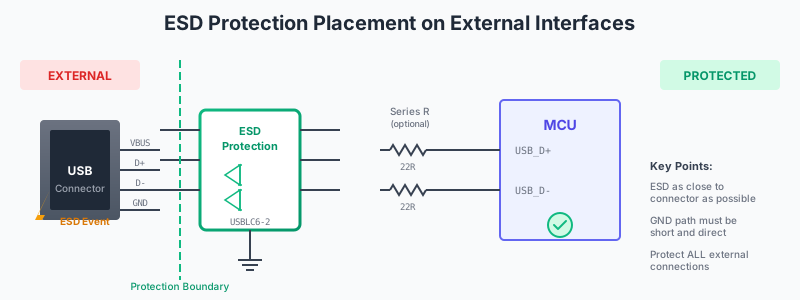
Every externally accessible connection needs ESD protection. This includes:
- USB data lines and power
- Ethernet interfaces
- GPIO headers
- Any connector that users might touch
- Button inputs
- Display interfaces
- Antenna connections
Overvoltage Protection
Input power should have:
- TVS diode: For transient voltage clamping
- Fuse: To disconnect during fault conditions
- Input voltage monitoring: For systems that need graceful shutdown
Reverse Polarity Protection
Common protection methods:
- Series diode: Simple but wastes 0.3-0.7V
- P-channel MOSFET: Low loss, commonly used
- Ideal diode controller: Best efficiency, higher cost
Component-Level Review
Passive Components
Resistors:
- Calculate power dissipation: P = I²R or P = V²/R
- Verify voltage rating (especially for small packages like 0402)
- Check tolerance requirements for precision circuits
- Confirm value notation is unambiguous (4K7, not 4.7K)
Capacitors:
- Tantalum: Voltage rating should be ≥20% above maximum voltage (50% preferred)
- Ceramic: Account for DC bias derating (a 10µF may be only 3µF at operating voltage)
- Electrolytic: Check polarity and ripple current rating
Inductors:
- Saturation current rating must exceed maximum operating current
- DCR (DC resistance) affects efficiency
- Shielded vs. unshielded consideration for EMI-sensitive designs
Active Components (ICs)
- Pin-by-pin verification: Check every pin against the datasheet, not just the ones you think are important
- Unused pins: Follow datasheet recommendations (some must be grounded, some left floating, some tied high)
- Multi-part packages: Verify all opamps in a quad package are accounted for; unused amplifiers need proper termination
- Thermal pads: Ensure thermal/ground pads are connected correctly
Connectors
- Pull resistors on signal pins for defined states when disconnected
- Decoupling capacitors on power pins
- ESD protection on exposed lines
- Proper mating connector specified
- Pin numbering matches mechanical drawing
Communication Interface Review
I2C Bus
- Pull-up resistors: Required on both SDA and SCL (typically 2.2kΩ-10kΩ)
- Address conflicts: Verify all devices on the bus have unique addresses
- Bus capacitance: Total bus capacitance should be <400pF for standard mode
- Level shifting: Required when mixing 3.3V and 5V devices
I2C pull-up calculation:
R_max = t_r / (0.8473 × C_bus)
R_min = (V_cc - V_OL) / I_OL
Example: 3.3V system, 200pF bus, 100kHz
R_max = 1µs / (0.8473 × 200pF) ≈ 5.9kΩ
R_min = (3.3V - 0.4V) / 3mA ≈ 970Ω
Recommendation: Use 2.2kΩ-4.7kΩ for this system
SPI Bus
- Chip select lines: Each device needs its own CS, with pull-up for default inactive state
- Clock polarity and phase: Verify CPOL/CPHA settings match between master and slaves
- Series resistors: May need termination on high-speed SPI lines
UART
- TX/RX crossover: TX of one device connects to RX of the other
- Flow control: If using RTS/CTS, verify proper connection
- Level shifting: RS-232 requires level conversion from logic levels
Microcontroller Review
GPIO Mapping
Create a GPIO mapping spreadsheet that documents for each pin:
- Physical pin number
- GPIO name/number
- Default function at reset
- Intended function in your design
- Alternate function capabilities
- Special notes (5V tolerant, analog capable, etc.)
This spreadsheet becomes invaluable during firmware development and debugging.
Boot Configuration
Verify boot configuration pins are correctly set:
- Boot mode selection: Pins that select between flash boot, UART boot, USB boot, etc.
- Configuration straps: Options for clock source, crystal parameters
- Default states: Should the device boot from flash automatically?
Debug Access
Ensure adequate debug provisions for development and production test:
- Debug connector: JTAG, SWD, or manufacturer-specific debug port
- UART console: For firmware debug output
- Test points: On critical signals for scope probing
- LED indicators: At minimum, one "heartbeat" LED for firmware activity
Common Errors to Watch For
Based on analysis of thousands of schematic reviews, these are the most frequently caught errors:
Power Issues
- • Missing decoupling capacitors
- • Incorrect regulator capacitor ESR
- • Power rail not connected
- • Wrong voltage on analog supply
- • Insufficient current capacity
Connection Issues
- • Unconnected pins
- • Wrong pin assignments
- • Missing ground connections
- • Net label typos
- • Cross-sheet connection errors
Component Issues
- • Wrong component values
- • Reversed polarity (diodes, caps)
- • Inadequate voltage ratings
- • Wrong package/footprint
- • Obsolete/unavailable parts
Signal Issues
- • Missing pull-up/pull-down
- • Floating inputs
- • Level mismatch (3.3V vs 5V)
- • Missing termination resistors
- • TX/RX swapped
Documentation Review
Schematic Style & Readability
A well-organized schematic is easier to review and maintain:
- Signal flow: Left-to-right, top-to-bottom
- Power convention: Positive at top, ground at bottom
- Consistent net naming: Use meaningful names (SPI_MOSI, not NET47)
- Hierarchical organization: Related circuits grouped on the same sheet
- Title block: Complete with version, date, designer name
BOM Review
- Part numbers: Every component has a specific manufacturer part number
- Availability: Parts are in stock and not end-of-life
- Value consolidation: Minimize unique values where possible
- Second sources: Critical components have alternates identified
Complete Review Checklist
Use this comprehensive checklist during your reviews. Download the printable PDF version.
Power Supply
- ☐Every IC power pin has a decoupling capacitor
- ☐Voltage regulators have correct input/output capacitors
- ☐Power sequencing requirements are met
- ☐Total current budget is within regulator capacity
- ☐LED indicator on each power rail
Protection
- ☐ESD protection on all external interfaces
- ☐Input power has reverse polarity protection
- ☐Overvoltage protection on input power
- ☐Fuse or polyfuse on input power
Signals & Connections
- ☐All reset pins have pull-up resistors and filter capacitor
- ☐No floating inputs on any IC
- ☐I2C buses have pull-up resistors
- ☐SPI chip selects have default pull-up
- ☐Level shifters present where voltage domains cross
- ☐UART TX/RX correctly crossed between devices
Components
- ☐Every symbol pinout verified against datasheet
- ☐Capacitor voltage ratings adequate (tantalums ≥50% margin)
- ☐Resistor power dissipation verified
- ☐Diode and LED polarity verified
- ☐Unused op-amp/comparator sections terminated properly
MCU & Digital
- ☐Boot configuration pins set correctly
- ☐GPIO mapping documented and verified
- ☐Debug interface accessible
- ☐Crystal/oscillator circuit matches datasheet
Documentation
- ☐ERC runs with no errors (warnings evaluated)
- ☐All components have part numbers assigned
- ☐Schematic is readable (proper signal flow, organization)
- ☐Title block complete with version and date
Tools & Automation
While manual review remains essential, leverage these tools to augment your process:
- EDA Built-in ERC: KiCad, EasyEDA, Altium all have electrical rule checking—use it!
- Custom DRC rules: Define project-specific checks (e.g., "all tantalum capacitors must have 50% voltage margin")
- BOM validation tools: Verify part availability and pricing automatically
- AI-powered review: Tools like Schemalyzer can identify common issues automatically
Collaborative Review Best Practices
Schematic review works best as a collaborative activity. Here's how to run effective review meetings:
- Distribute materials in advance: Share schematic, block diagram, and GPIO mapping 1-2 days before the review
- Include diverse perspectives: Hardware engineers, firmware developers, PCB designers, and test engineers all catch different types of issues
- Walk through the design: Have the designer explain the architecture and key design decisions
- Assign action items: Every issue found should have an owner and due date
- Track changes: Maintain revision history showing what was changed and why
FAQ
How long should a schematic review take?
A thorough review of a medium-complexity design (MCU + few peripherals) typically takes 2-4 hours. Complex designs may require multiple sessions over several days. Rushing the review defeats its purpose—schedule adequate time.
Who should be involved in the review?
At minimum: the designer, a peer hardware engineer, and a firmware engineer who will write the code. For critical designs, include a PCB layout engineer, test engineer, and manufacturing representative.
Should I review before or after simulation?
Both. A preliminary review before simulation catches obvious errors that would waste simulation time. A second review after simulation confirms the design meets requirements and simulation results are reasonable.
How do I prioritize review findings?
Categorize issues by severity:
- Critical: Will prevent the board from working (must fix)
- Major: Will cause significant problems (should fix)
- Minor: Best practice violations, documentation issues (nice to fix)
Can AI tools replace human review?
Not entirely, but they're increasingly valuable. AI tools excel at catching systematic errors (missing decoupling caps, unconnected pins) consistently. Human reviewers are still essential for understanding design intent, evaluating trade-offs, and catching context-dependent issues.
Conclusion
Effective schematic review is a skill that develops with practice. By following the systematic approach outlined in this guide—moving from high-level architecture through detailed component verification—you'll catch errors before they become expensive problems.
Key takeaways:
- Use a structured, multi-phase review process
- Focus on power integrity, protection, and signal connections
- Verify every component against its datasheet
- Run automated checks (ERC/DRC) as a complement to manual review
- Make review collaborative—multiple perspectives catch more issues
- Document findings and track resolution
Remember: the goal isn't to find every possible improvement, but to ensure the design will work reliably and can be manufactured successfully. A good schematic review balances thoroughness with practicality.
Automate Your Schematic Review
Schemalyzer uses AI to automatically analyze your EasyEDA schematics, identifying common errors and providing detailed component analysis. Catch issues before they reach your PCB.
Try Schemalyzer Free